Admin tools improved by Matrix
Matrix Framework upgrades the Jimdo editor where it matters most — file management, navigation, support inside the native sidebar, hero backgrounds, per-module styling, Site Health checks, and built-in one-page / mega menu — so building and maintaining sites feels faster and more professional.
Overview
Jimdo’s admin is solid for simple sites — Matrix fills the gaps agencies and power users hit every day. Some upgrades need no config (they ship with the framework). Others
are toggled in MatrixConfig.features in Edit Head.
Store images
Large product images for size-3 store items — sharp on retina displays.
Jump to section →Matrix Hub
Docs, support, marketplace and changelog inside Jimdo’s native sidebar.
Jump to section →One-page & mega menu
Built-in smooth-scroll sections and mega dropdown navigation.
Jump to section →1 Files: copy URL & multi-upload
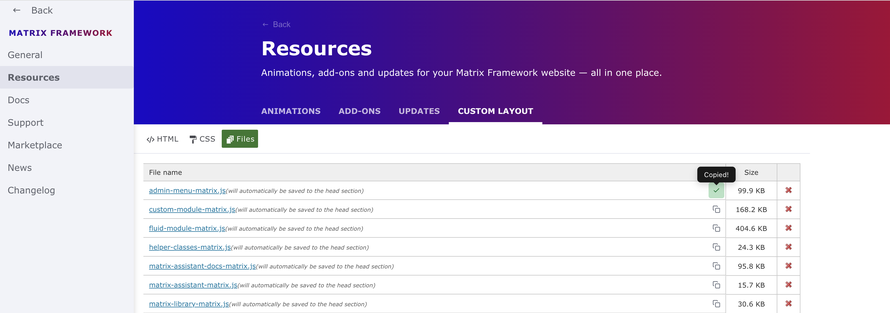
Jimdo’s Custom Template Files tab normally forces you to open each file to grab its URL, and upload one file at a time. Matrix adds a clipboard action on every row and lets you select multiple files in one go.
-
Copy URL — clipboard icon on each file row; copies the Jimdo CDN URL with a “Copied!” tooltip
-
Multi-file upload — pick several files; Matrix uploads them sequentially with “Uploading N of M…” progress
-
In-place refresh — the file list updates without leaving the Files tab
-
Works everywhere the layout Files iframe appears (Custom Layout, Hub Resources, Helper Classes, Page Builder embeds)
No setup required
Included in matrix.js / admin-menu.matrix.js. Open Design → Custom Template → Files and the enhancements are already there.


3 Large images for store items
Jimdo often serves smaller responsive candidates for product photos. Matrix forces a large (1820px) main image for size-3 store product modules so shop pages look crisp on desktop and high-DPI screens.
-
Automatic on
.cc-shop-product-size-3product modules -
Also applies when switching alternate product images in admin
-
No UI toggle and no config flag — runs with the framework CSS/JS

4 Matrix Hub — support inside Jimdo admin
Matrix Hub adds a Matrix Framework item to Jimdo’s native admin sidebar. Docs, Support, Marketplace, News, Changelog and Resources open as embedded panels — so you never leave the editor to look something up.
-
General — live overview: framework version, license, active template, enabled modules
-
Resources — Animations, Add-ons, Updates, Custom Layout (tabbed)
-
Docs / Support / Marketplace / News / Changelog — official Matrix pages in iframes
-
Read-only — the Hub does not write site settings; it is your in-admin knowledge base
features: {
  matrixAdminHub: true,  // Matrix Framework in Jimdo native sidebar (default)
  matrixAdmin: true      // Sliding admin menu (independent of Hub)
}
5 Custom hero section (Jimdo Background)
Instead of a static image module, Matrix Framework can use Jimdo’s native Design → Background (image, slideshow, video, or color) as the page hero — with Matrix variables to place content inside that area.
-
Set the page background in Jimdo Design → Background
-
Add a Columns + Widget/HTML block with a hero variable, e.g.
draggable-hero -
Style overlays, fullscreen, transparent header and spacing with Matrix variables / Style Editor
-
Tune global hero min-height in Global Settings → Hero

6 Custom Module — more options for Jimdo modules
Default Jimdo modules (heading, image, button, divider, spacing, form) get a floating Module Styles popup. You restyle that single module visually — padding, colors, borders, form inputs — without writing CSS. Rules are scoped to the module id.
-
Open a supported module → click the Module Styles control
-
Adjust presets / options → Save (written into Style Editor CSS)
-
Forms use
--matrix-form-*variables so per-module styles win over global form themes
features: {
  customModule: true  // default
}
Full walkthrough: Custom Module guide.
7 Site Health
Site Health is a toolbar scanner for the current editor page — SEO basics, mobile-template risks, and framework hygiene — with a score, grouped issues, and one-click “Go to” highlights.
-
Open Matrix Toolbar → Site Health → Scan page
-
Review Checks passed vs Issues; jump to the problematic module
-
Opt-in: set
siteHealth: true(default isfalse)
Full guide: Site Health.
8 Built-in one-page navigation
Turn first-level menu items into smooth-scroll anchors on the published home page. Add sections from the + panel with the One-Page Section module — no manual
HTML required.
-
Enable
onePage: true -
On the home page, add a One-Page Section for each first-level menu item
-
Publish — menu items smooth-scroll; sub-pages keep working as normal pages
Full guide: One-Page Navigation.
Config flags cheat sheet
| Feature | Flag | Default |
|---|---|---|
| Files copy & multi-upload | — | Always on |
| Nav drag & drop | — | Always on |
| Large store images | — | Always on |
| Matrix Hub |
matrixAdminHub
|
true
|
| Custom hero (variables) |
variableModule
|
true
|
| Custom Module |
customModule
|
true
|
| Site Health |
siteHealth
|
false
|
| One-page navigation |
onePage
|
true
|
| Mega menu |
megaMenu
|
true
|