Mega Menu
Turn your Jimdo navigation into a professional mega menu with hover dropdowns and mobile-friendly toggles. Enable one flag — Matrix converts hs-menu to hs-mega and wires up the dropdown behavior for you.
Overview
Mega Menu upgrades Jimdo’s standard nested navigation into a full dropdown experience. When enabled, Matrix finds your .hs-menu container, swaps it to .hs-mega, and
activates dropdown icons plus click/hover behavior for any first-level item that has child pages.
-
One config flag — no HTML class edits required
-
Hover dropdowns on desktop; tap-to-toggle on mobile
-
Parent links still navigate normally — dropdowns don’t block them
-
Works with Style Editor nav colors, sidebar layout, and sticky headers
How it works
On page load, Matrix checks your config and upgrades the navigation container.
| Step | What happens |
|---|---|
| Config check |
If megaMenu: true, Matrix looks for .hs-menu.
|
| Class swap |
hs-menu is replaced with hs-mega so mega-menu CSS applies.
|
| Dropdown icons |
First-level items that contain a nested ul get menu-dropdown-icon.
|
| Interactions |
Desktop: hover opens the panel. Mobile/touch: tap toggles .active. Outside click closes open dropdowns.
|
1 Quick setup
Getting mega menu running takes one config change and a nested navigation.
Step 1 — Enable the feature
Set megaMenu: true in your configuration. The script ships with the main Matrix utilities bundle.
window.MatrixConfig = {
  features: {
    megaMenu: true // Convert hs-menu → hs-mega + enable dropdowns
  }
};Step 2 — Nest pages in Jimdo navigation
In the Jimdo navigation editor, drag pages under a parent so they become children of that first-level item.
Step 3 — Publish & test
Publish the site. Hover a parent item on desktop, or tap it on mobile, to open the dropdown.
2 Navigation structure
Mega menu works with Jimdo’s nested navigation variant. Your layout already includes something like this — Matrix only changes the outer class:
<!-- Before (default) -->
<div class="hs-menu weight-400 bg-nav-inner cc-clearover">
  <div>
    <nav>
      <var levels="1,2,3" expand="true" variant="nested" edit="1">navigation</var>
    </nav>
  </div>
</div>

<!-- After Matrix runs (automatic) -->
<div class="hs-mega weight-400 bg-nav-inner cc-clearover">
  …
</div>
Desktop & mobile
| Context | Behavior |
|---|---|
| Desktop | Hover a parent with children to show the dropdown (CSS). Clicking the parent link still navigates to that page. |
| Mobile / touch |
Tap a parent to toggle the .active class and open/close the panel. Tapping another parent closes the previous one.
|
| Outside click | Clicking anywhere outside an open mega-menu item closes all open dropdowns. |
| Sidebar layout | In sidebar mode, mega menu items stack vertically and fly out to the right — same Pattern as the regular menu. |
Admin notification
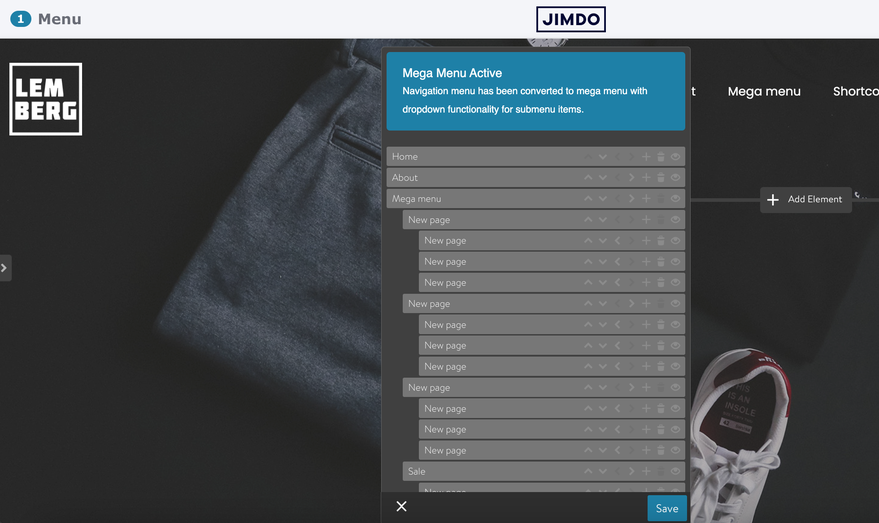
When mega menu is active and you open the Jimdo navigation editor, Matrix injects a notice at the top of the panel so you know the conversion ran:
Navigation menu has been converted to mega menu with dropdown functionality for submenu items.
-
Only shown in admin / editor mode
-
Waits for the nav editor content to finish loading
-
Never duplicates — existing notice is reused
Styling with Style Editor
Mega menu uses the same Style Editor tokens as the regular menu — nav link color, subnav background, link background radius, and color-nav accents all apply to .hs-mega as well.
-
Navigation styles in Style Editor control colors and link radius for both
hs-menuandhs-mega - Submenu background uses
--bg-subnav - Sticky header and sidebar layout rules already include
.hs-megaselectors
Troubleshooting
| Issue | Fix |
|---|---|
| No dropdowns appear |
Confirm megaMenu: true, that Matrix scripts loaded, and that parent items have nested child pages.
|
Class stays hs-menu
|
Check the config is loaded before Matrix, and that a .hs-menu element exists on the page.
|
| Admin notice missing | Open the navigation editor in admin — the notice only appears there, after content finishes loading. |
| Parent link doesn’t navigate |
Unexpected — Matrix does not call preventDefault on parent links. Check for other scripts intercepting clicks.
|
| Need to debug |
Set debugMode: true — Matrix logs “Mega menu activated - hs-menu changed to hs-mega” in the console.
|
If you have encountered any bugs, errors, or unexpected behavior, please leave a comment below.