Skip to content
  • Home
  • Features
    • Matrix Framework
    • Matrix One
    • Plugin Toolkit
    • Matrix Library
  • Templates
  • Support
  • Pricing
  • Home
  • Features
    • Matrix Framework
    • Matrix One
    • Plugin Toolkit
    • Matrix Library
  • Templates
  • Support
  • Pricing
  1. Support

Custom Modules

Framework Core

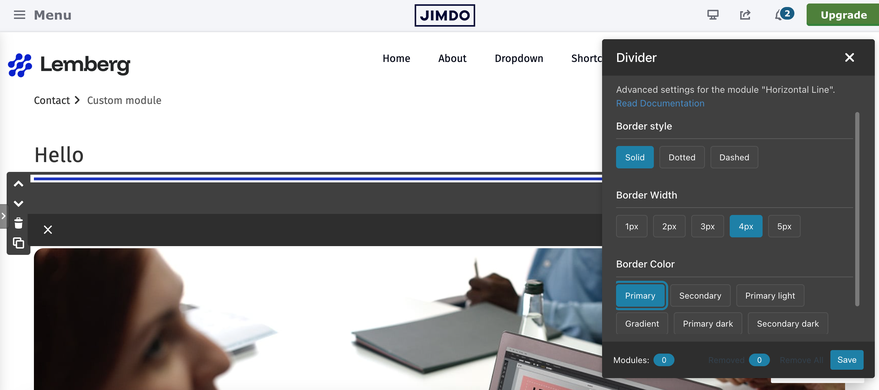
The Custom Modules feature is a comprehensive system that allows users to customize the styling of various Jimdo modules (headers, images, buttons, dividers, spacing, and forms) through an intuitive popup interface. The system generates CSS rules dynamically and manages them within the Style Editor's CSS field.

Key Features

- Visual Popup Interface: User-friendly popups for each module type

- Dynamic CSS Generation: Automatically generates and manages CSS rules

- Module Tracking: Tracks customized modules and unused styles

- Cleanup Tools: "Removed" and "Remove All" buttons for managing styles

- Preselection Workflow: Intuitive border-radius selection with slider

- Mutual Exclusivity: Ensures only one tag per section can be active

- Persistent State: Remembers selected styles across popup reopens
browser-frame

How to activate

In the MatrixConfig object set customModule: true

Settings> Edit Head
customModule: true, // Custom module styles system for module customization

How It Works

Module Detection

When a module is opened in admin mode, the system:


1. Checks if the opened module matches any configured selector

2. Shows the "Module Styles" button (slider icon).

3. Button click opens the module-specific popup

Usage Guide

1. Opening a Module Popup:


- Open any customizable module

- Click the "Custom module" button (slider icon)

- The module-specific popup will appear

browser-frame

2. Applying Styles:


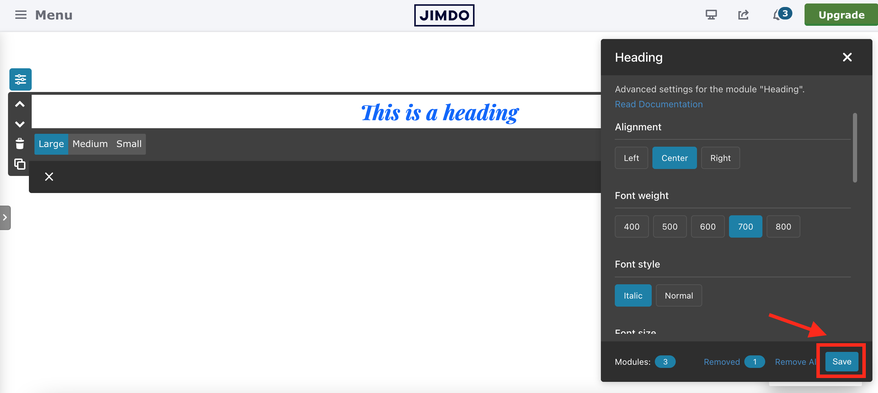
- Click tags to apply styles

- For border-radius: Click tag → adjust slider → click tag again to confirm

- Active tags show blue background

- Click the "Save" button in the custom module popup footer to save changes directly

- Changes are applied immediately
 

browser-frame

Style Application

When a tag is clicked:

1. Extract module ID from the opened module element

2. Build CSS selector: `#cc-m-{moduleId} {cssSelector}`

3. Generate CSS rule with appropriate properties


Popup footer
browser-frame

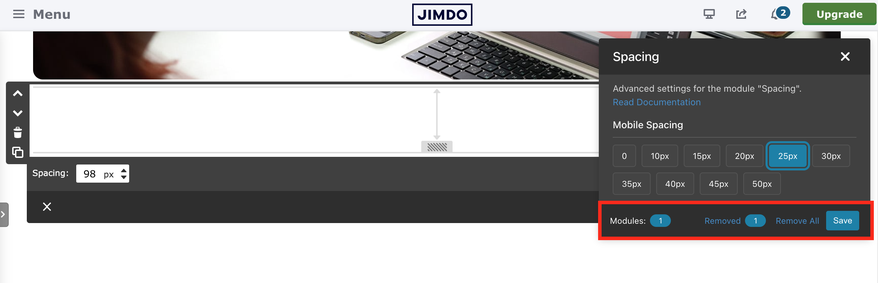
In the footer section of a popup you typically see:


  • Number of custom modules used on the page
  • Number of removed custom modules

If a module was removed from the page but had custom CSS applied, that CSS might still exist in the Custom CSS area. This number shows how many of these “orphaned” custom modules exist.

  • Remove link for all custom modules on the page

This allows you to delete all custom CSS associated with modules on the page, essentially cleaning up any leftover styles from removed modules.

  • Save button

If you have encountered any bugs, errors, or unexpected behavior, module, please leave a comment below.

Comments: 0
Get started
Gobal colors
  bg-primary
  bg-primary-light
  bg-primary-dark
  bg-secondary
  bg-secondary-dark
Template colors
  body
  top-header
  top-header-inner
  header
  header-inner
  navigation-inner
  navigation color
  dropdown background color
  content
Footer Styles
  background
  text color
  link color
  horizontal line
Buttons
  style 1
  style 2
  style 3
  text color
Mobile navigation
  background color
  navigation color
Other elements
  social icons
  top header border
  header border
  nav inner border
  footer border
 
Template configurations
 
has-sticky-logo has-large-header primary-font has-center-nav has-header-blur no-shopping-cart
 
Top header inner


Header inner


Navigation inner


Navigation styles
 
size-15 weight-400
 
Sub-menu (breadcrumbs) styles
 
size-15
 
Mobile Navigation styles
 
size-30
 
Content styles
 
form-white
 
Footer styles
 
o-form has-thin-border has-border-style-solid has-border-top has-footer-border-color
 
Footer background image


Typography

Heading H1
weight-400
 
Heading H2
weight-400
 
Heading H3
weight-400
 
Body text (p, table, td)
 
 
Buttons
weight-400
 
 
Advanced settings
 
Custom CSS

#cc-inner .my-class {

color:#f0f0f0;

}

/* MATRIX-CUSTOM-MODULES-START */

#cc-m-7792741551 h1, #cc-m-7792741551 h2, #cc-m-7792741551 h3 {font-size:20px !important;}

#cc-m-7792741851 h1, #cc-m-7792741851 h2, #cc-m-7792741851 h3 {font-size:20px !important;}

#cc-m-7792930551 h1, #cc-m-7792930551 h2, #cc-m-7792930551 h3 {font-size:20px !important;}

#cc-m-12388126494 h1, #cc-m-12388126494 h2, #cc-m-12388126494 h3 {font-weight:600 !important;}

#cc-m-12388126494 h1, #cc-m-12388126494 h2, #cc-m-12388126494 h3 {font-size:40px !important;}

/* MATRIX-CUSTOM-MODULES-END */

/* MATRIX-GLOBAL-SETTINGS-START */

:root {

--content-width: 1170px;

--special-pages-content-width: 900px;

}

/* HAMBURGER-BAR-START */

:root { --hamburger-btn-background: transparent; --hamburger-btn-bg: transparent; --hamburger-btn-bg-active: transparent; }

/* HAMBURGER-BAR-END */

#cc-inner #hs-container .j-formnew input[type='submit'],

#cc-inner #hs-container input.submitUser,

#cc-inner .hs-button,

#cc-inner .j-calltoaction-link,

#cc-inner input.cc-checkout-btn,

#cc-inner a.cc-shop-addtocard {

padding: 14px 35px !important;

border-radius: 8px;

}

/* MOBILE-FULLWIDTH-BUTTONS-START */

@media only screen and (width <= 746px) {

#cc-inner #hs-container .j-formnew input[type='submit'],

#cc-inner #hs-container input.submitUser,

#cc-inner .hs-button,

#cc-inner .j-calltoaction-link {

width: 100% !important;

margin: 5px auto 0 auto;

box-sizing: border-box;

text-align: center !important;

}

}

/* MOBILE-FULLWIDTH-BUTTONS-END */

/* MATRIX-GLOBAL-SETTINGS-END */


Note:
All changes made here will be applied to your entire website.
draggable-logo

Build faster, smarter, and more flexible Jimdo websites.

has-right-col-border

Products

Matrix Framework

Matrix One

Matrix Plugin Toolkit

Resources

Support

Changelog

Showcase

Marketplace

Community

Blog

Archive

GitHub


About | Privacy Policy | Cookie Policy | Sitemap | Withdraw contract
Created with Jimdo
Log in Log out | Edit
  • Scroll to top
Close