Installation
This guide will walk you through the process of installing the Matrix Framework on your website from scratch. Please follow each step carefully to ensure a successful installation.
Important requirements
Following these guidelines will ensure a smooth installation of the Matrix Framework. Once the installation is complete, you can proceed with further customization or add your own code to the template.
- Please save the links or custom code you have in the head section. If you have any custom code in the Head (in the admin menu > settings > Edit Head), please remove them and save them in any text editor. You can add them once you have installed the Matrix Framework on your site.
-
- The Matrix Framework is jQuery-free and built entirely with vanilla JavaScript. No jQuery library is required. If you are migrating from a previous template or custom layout that relied on jQuery plugins, please ensure that any unused jQuery dependencies are removed to avoid unnecessary overhead or potential conflicts.
-
Upload all source files to your website
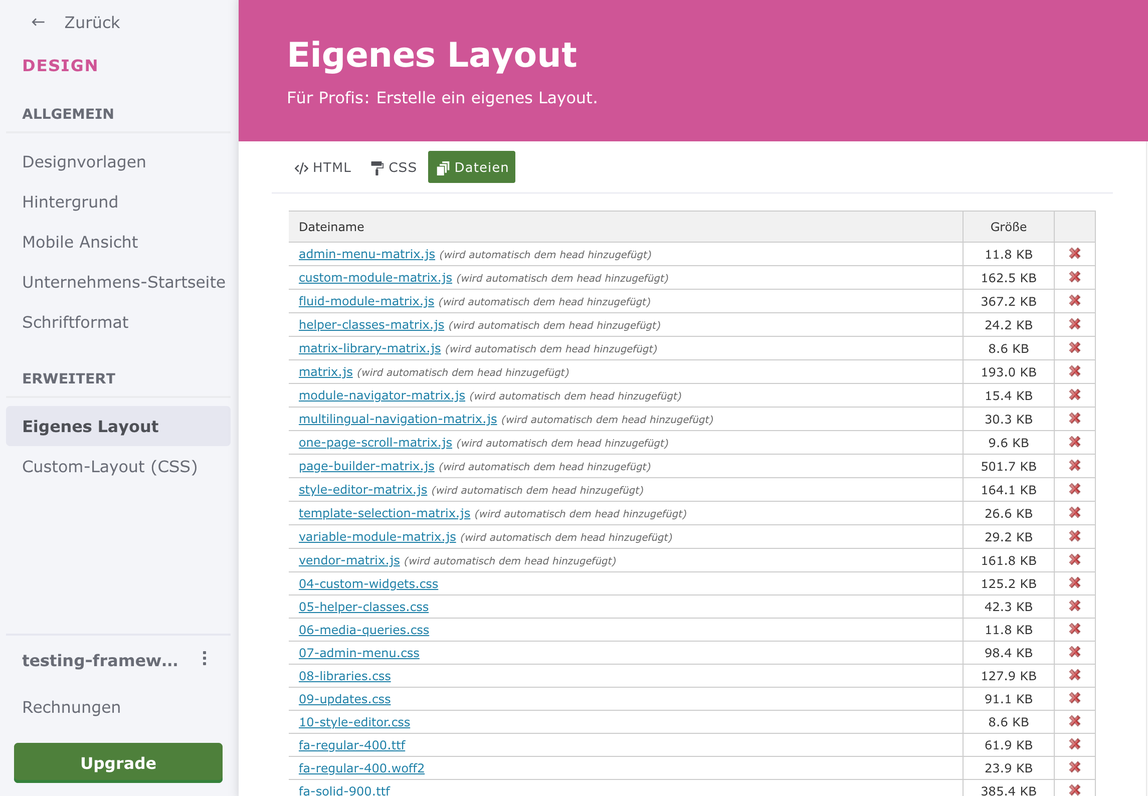
Go to "Updates" section ( the access password was sent to you after the purchase) , download all files and upload them on your website (In Admin mode > Menu > Design > Custom Template > Files). So, it should look like the screenshot below.
If you do not require features such as the mega menu, multilingual navigation, or other optional functionality, you may choose not to upload the corresponding files.
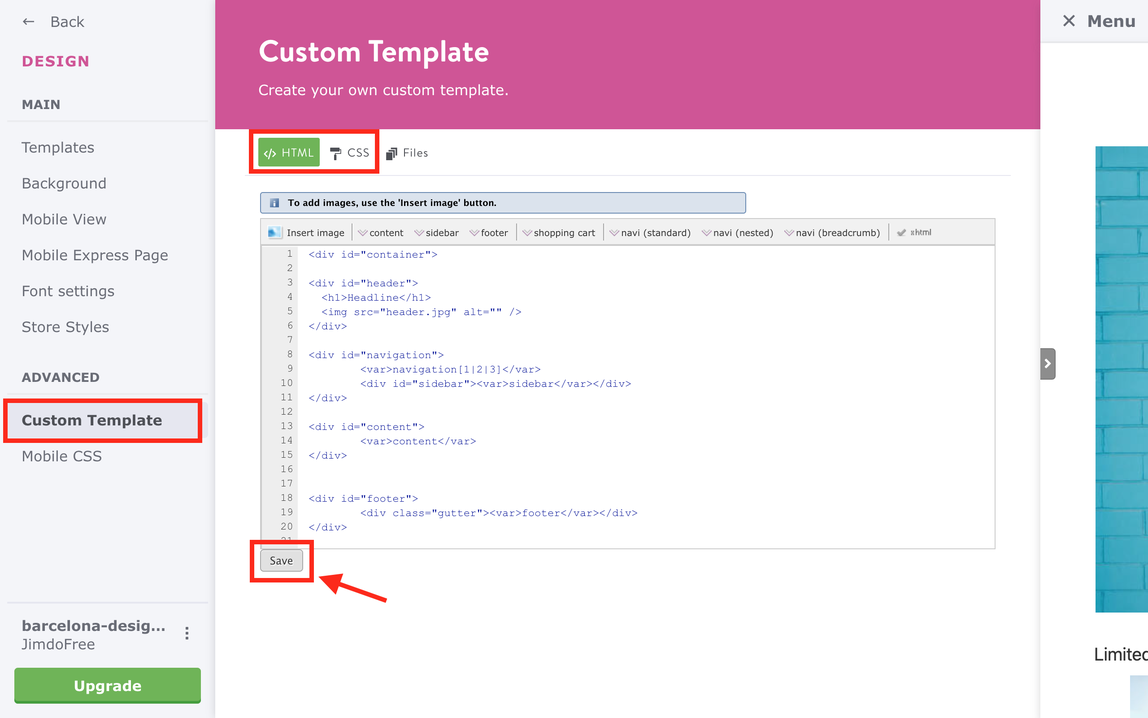
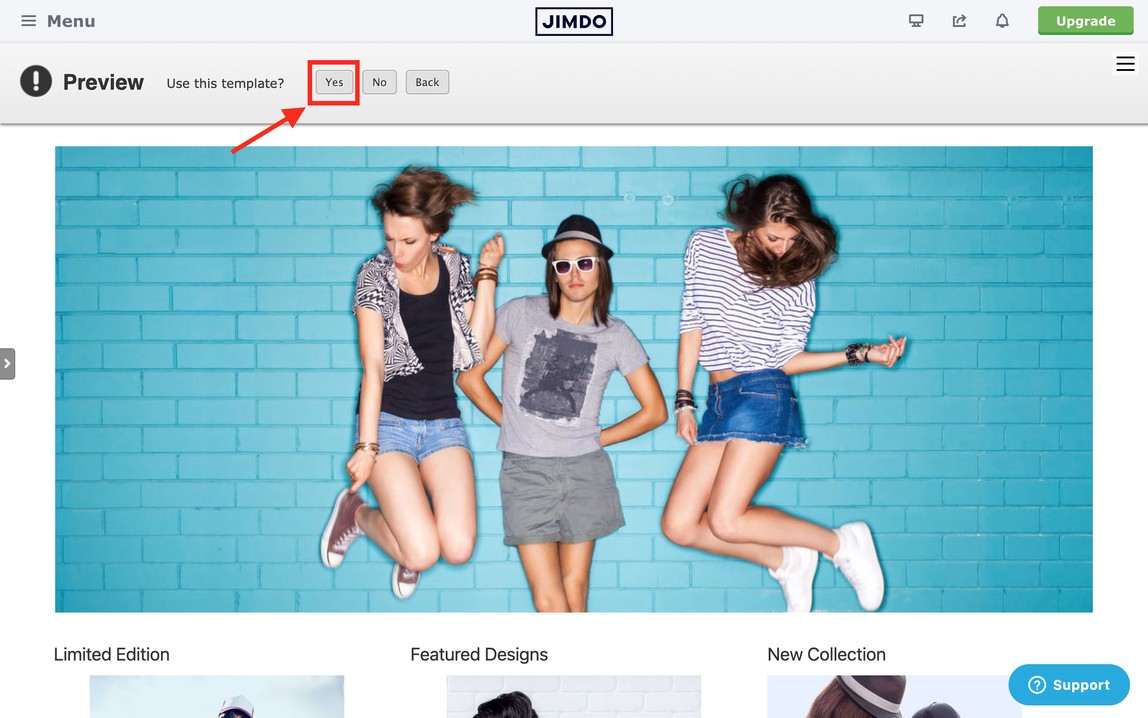
Add HTML and CSS. On the same page under 'Updates', navigate to Source files and select Layout. Then, copy the HTML and CSS code and paste it into your website (Design > Custom Template > HTML/CSS). Finally, click the save button at the bottom of the page to confirm the changes.
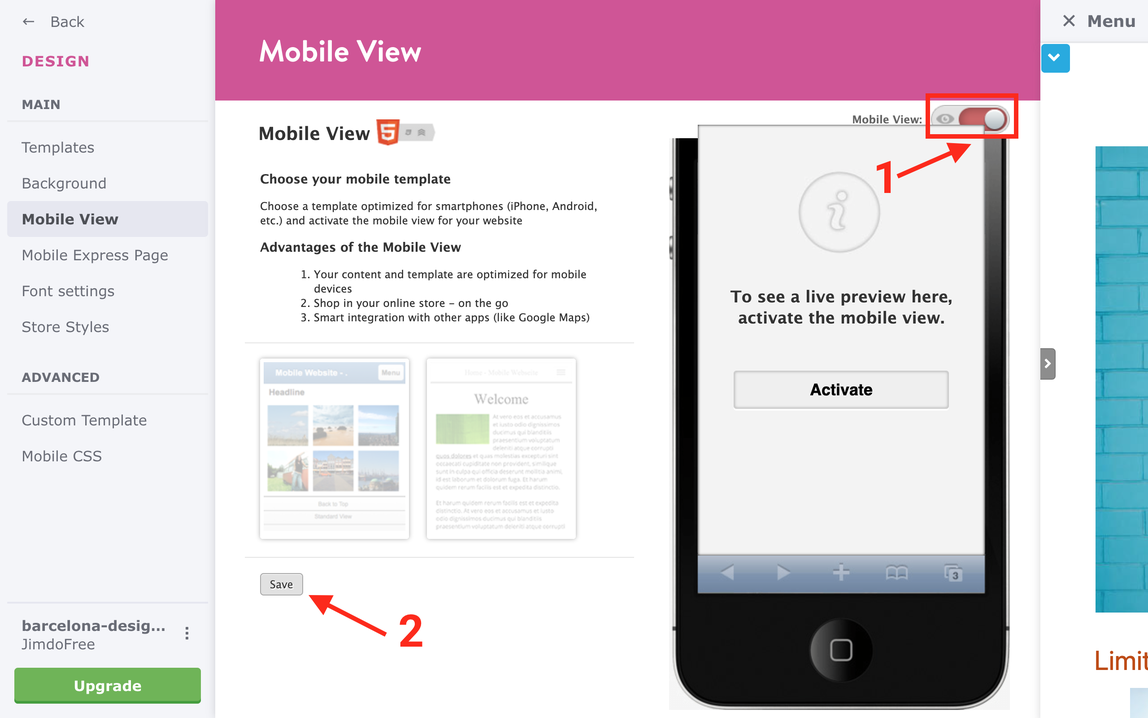
Deactivate the default Jimdo mobile version
Setup the global typography styles.
Please note that in this section, you can only configure the initial font settings, such as global text, headings, links, and horizontal line.
Further customization options are available in the Global Settings section of the Framework settings.

Add Config Options in Head to activate Matrix features
<script type="text/javascript">
//<![CDATA[
// Matrix Configuration Settings
 features: {
      matrixAdmin: true,         // Matrix admin sliding menu
      styleEditor: true,         // Matrix Style editor
      variableModule:true,       // Matrix variables button and popup
      helperClassesModule: true, // Helper classes button and popup
      moduleNavigator: true,     // Module navigator button and popup
      customModule: true,        // Custom module styles system for module customization
      templateSelection: true,   // Template selection button and popup in style editor
      customLayout: true,        // Show config classes in style editor
      onePage: false,            // One-page scroll navigation
      multilingualPage: false,   // Multilingual page navigation structure
      megaMenu: false,           // Mega menu functionality
      pageBuilder: true          // Page Builder for text modules

    }
  };

  //]]>
</script>
Install the Matrix Style Editor
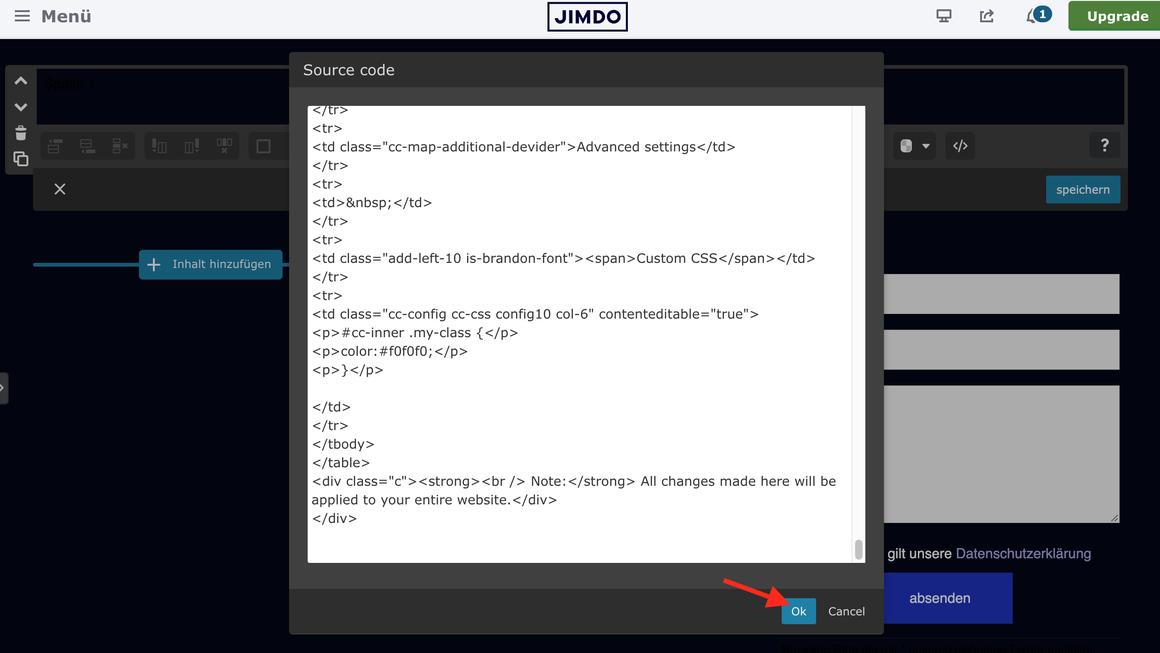
Copy the code below and paste it into the Edit HTML section of the “Tables” module located in the footer. This step is essential to ensure that the Style Editor is available across all pages of your website.

<div class="admin-only mid-round add-10 color-white color-switcher" data-template-name="lemberg" spellcheck="false" style="background: #404040; max-height: 240px; overflow-y: scroll;" data-template="lemberg">
<div class="cc-map-additional-devider"><span>Gobal colors</span></div>
<table align="" border="0" cellspacing="10" cellpadding="0" width="100%" height="0%" class="mceEditable" style="border: 0px solid #ffffff; background-color: rgba(0, 0, 0, 0);">
<tbody>
<tr style="height: 32px;">
<td class="color-select color1" style="background-color: #1b2cc1;" contenteditable="false"> </td>
<td class="class-name" contenteditable="false">bg-primary</td>
</tr>
<tr style="height: 32px;">
<td class="color-select color2" style="background-color: #e8ecfc;" contenteditable="false"> </td>
<td class="class-name" contenteditable="false">bg-primary-light</td>
</tr>
<tr style="height: 32px;">
<td class="color-select color3" style="background-color: #030717;" contenteditable="false"> </td>
<td class="class-name" contenteditable="false">bg-primary-dark</td>
</tr>
<tr style="height: 32px;">
<td class="color-select color4" style="background-color: #dda4ff;" contenteditable="false"> </td>
<td class="class-name" contenteditable="false">bg-secondary</td>
</tr>
<tr style="height: 32px;">
<td class="color-select color5" style="background-color: #3b28cc;" contenteditable="false"> </td>
<td class="class-name" contenteditable="false">bg-secondary-dark</td>
</tr>
</tbody>
</table>
<div class="cc-map-additional-devider"><span>Template colors</span></div>
<table align="" border="0" cellspacing="10" cellpadding="0" width="100%" class="mceEditable" style="border: 0px solid #ffffff; background-color: rgba(0, 0, 0, 0);">
<tbody>
<tr style="height: 32px;">
<td class="color-select color6" style="background-color: rgba(0, 0, 0, 0);" contenteditable="false"> </td>
<td class="class-name" contenteditable="false">body</td>
</tr>
<tr style="height: 32px;">
<td class="color-select color7" style="background-color: #1b2cc1;" contenteditable="false"> </td>
<td class="class-name" contenteditable="false">top-header</td>
</tr>
<tr class="" style="height: 32px;">
<td class="color-select color7b" style="background-color: rgba(0, 0, 0, 0);" contenteditable="false"> </td>
<td class="class-name" contenteditable="false">top-header-inner</td>
</tr>
<tr style="height: 32px;">
<td class="color-select color8" style="background-color: #ffffff;" contenteditable="false"> </td>
<td class="class-name" contenteditable="false">header</td>
</tr>
<tr class="" style="height: 32px;">
<td class="color-select color8b" style="background-color: rgba(0, 0, 0, 0);" contenteditable="false"> </td>
<td class="class-name" contenteditable="false">header-inner</td>
</tr>
<tr class="" style="height: 32px;">
<td class="color-select color8c" style="background-color: rgba(0, 0, 0, 0);" contenteditable="false"> </td>
<td class="class-name" contenteditable="false">navigation-inner</td>
</tr>
<tr style="height: 32px;">
<td class="color-select color18" style="background-color: #030717;" contenteditable="false"> </td>
<td class="class-name" contenteditable="false">navigation color</td>
</tr>
<tr style="height: 32px;">
<td class="color-select color19" style="background-color: #e8ecfc;" contenteditable="false"> </td>
<td class="class-name" contenteditable="false">dropdown background color</td>
</tr>
<tr style="height: 32px;">
<td class="color-select color9" style="background-color: #ffffff;" contenteditable="false"> </td>
<td class="class-name" contenteditable="false">content</td>
</tr>
</tbody>
</table>
<div class="cc-map-additional-devider"><span>Footer Styles</span></div>
<table align="" border="0" cellspacing="10" cellpadding="0" width="100%" height="0%" class="mceEditable" style="border: 0px solid #ffffff; background-color: rgba(0, 0, 0, 0);">
<tbody>
<tr style="height: 32px;">
<td class="color-select color10" style="background-color: #030717;" contenteditable="false"> </td>
<td class="class-name" contenteditable="false">background</td>
</tr>
<tr style="height: 32px;">
<td class="color-select color11" style="background-color: #ffffff;" contenteditable="false"> </td>
<td class="class-name" contenteditable="false">text color</td>
</tr>
<tr style="height: 32px;">
<td class="color-select color12" style="background-color: #a1a8e7;" contenteditable="false"> </td>
<td class="class-name" contenteditable="false">link color</td>
</tr>
<tr style="height: 32px;">
<td class="color-select color13" style="background-color: #09143d;" contenteditable="false"> </td>
<td class="class-name" contenteditable="false">horizontal line</td>
</tr>
</tbody>
</table>
<table align="" border="0" cellspacing="10" cellpadding="0" width="100%" height="0%" class="mceEditable" style="border: 0px solid #ffffff; background-color: rgba(0, 0, 0, 0);"></table>
<div class="cc-map-additional-devider"><span>Buttons</span></div>
<table align="" border="0" cellspacing="10" cellpadding="0" width="100%" height="0" class="mceEditable" style="border: 0px solid #ffffff; background-color: rgba(0, 0, 0, 0);">
<tbody>
<tr style="height: 32px;">
<td class="color-select color14" style="background-color: #1b2cc1;" contenteditable="false"> </td>
<td class="class-name" contenteditable="false">style 1</td>
</tr>
<tr style="height: 32px;">
<td class="color-select color15" style="background-color: #1b2cc1;" contenteditable="false"> </td>
<td class="class-name" contenteditable="false">style 2</td>
</tr>
<tr style="height: 32px;">
<td class="color-select color16" style="background-color: #1b2cc1;" contenteditable="false"> </td>
<td class="class-name" contenteditable="false">style 3</td>
</tr>
<tr style="height: 32px;">
<td class="color-select color22" style="background-color: #ffffff;" contenteditable="false"> </td>
<td class="class-name" contenteditable="false">text color</td>
</tr>
</tbody>
</table>
<div class="c"></div>
<div class="cc-map-additional-devider"><span>Mobile navigation</span></div>
<table align="" class="mceEditable" style="border: 0px solid #ffffff; background-color: rgba(0, 0, 0, 0);" width="100%" height="0%" cellspacing="10" cellpadding="0" border="0">
<tbody>
<tr style="height: 32px;">
<td class="color-select color20" style="background-color: #e8ecfc;" contenteditable="false"> </td>
<td class="class-name" contenteditable="false">background color</td>
</tr>
<tr style="height: 32px;">
<td class="color-select color21" style="background-color: #030717;" contenteditable="false"> </td>
<td class="class-name" contenteditable="false">navigation color</td>
</tr>
</tbody>
</table>
<div class="cc-map-additional-devider"><span>Other elements</span></div>
<table align="" border="0" cellspacing="10" cellpadding="0" width="100%" height="0%" class="mceEditable" style="border: 0px solid #ffffff; background-color: rgba(0, 0, 0, 0);">
<tbody>
<tr style="height: 32px;">
<td class="color-select color17" style="background-color: #ffffff;" contenteditable="false"> </td>
<td class="class-name" contenteditable="false">social icons</td>
</tr>
<tr style="height: 32px;">
<td class="color-select color23" style="background-color: rgba(0, 0, 0, 0);" contenteditable="false"> </td>
<td class="class-name" contenteditable="false">top header border</td>
</tr>
<tr style="height: 32px;">
<td class="color-select color24" style="background-color: rgba(0, 0, 0, 0);" contenteditable="false"> </td>
<td class="class-name" contenteditable="false">header border</td>
</tr>
<tr style="height: 32px;">
<td class="color-select color25" style="background-color: rgba(0, 0, 0, 0);" contenteditable="false"> </td>
<td class="class-name" contenteditable="false">nav inner border</td>
</tr>
</tbody>
</table>
<div class="c"></div>
<table align="" border="0" cellspacing="0" cellpadding="3" width="100%" height="100%" class="mceEditable">
<tbody>
<tr>
<td class="cc-map-additional-devider"><span>Template configurations</span></td>
</tr>
<tr>
<td> </td>
</tr>
<tr>
<td class="cc-config config col-6" style="background-color: #2e2e2e; border: 1px solid #2e2e2e; padding: 3px; box-sizing: border-box; border-radius: 3px; width: 100%; min-height: 32px; color: #888888;" contenteditable="true">
<table align="" border="0" cellspacing="0" cellpadding="3" width="100%" height="100%" class="mceEditable" style="line-height: 18.2px;">
<tbody>
<tr>
<td class="cc-config config col-6" style="background-color: #2e2e2e; border: 1px solid #2e2e2e; padding: 3px; box-sizing: border-box; border-radius: 3px; width: 100%; min-height: 32px; color: #888888;" contenteditable="true">has-right-nav has-sticky-logo has-large-header primary-font</td>
</tr>
</tbody>
</table>
</td>
</tr>
<tr>
<td> </td>
</tr>
<tr>
<td class="cc-map-additional-devider"><span>Top header inner</span></td>
</tr>
<tr>
<td> </td>
</tr>
<tr>
<td class="cc-config config1a col-6" style="background-color: #2e2e2e; border: 1px solid #2e2e2e; padding: 3px; box-sizing: border-box; border-radius: 3px; width: 100%; min-height: 32px; color: #888888;" contenteditable="true"> </td>
</tr>
<tr>
<td> </td>
</tr>
<tr>
<td class="cc-map-additional-devider"><span>Header inner</span></td>
</tr>
<tr>
<td> </td>
</tr>
<tr>
<td class="cc-config config1b col-6" style="background-color: #2e2e2e; border: 1px solid #2e2e2e; padding: 3px; box-sizing: border-box; border-radius: 3px; width: 100%; min-height: 32px; color: #888888;" contenteditable="true"> </td>
</tr>
<tr>
<td> </td>
</tr>
<tr>
<td class="cc-map-additional-devider"><span>Navigation inner</span></td>
</tr>
<tr>
<td> </td>
</tr>
<tr>
<td class="cc-config config1c col-6" style="background-color: #2e2e2e; border: 1px solid #2e2e2e; padding: 3px; box-sizing: border-box; border-radius: 3px; width: 100%; min-height: 32px; color: #888888;" contenteditable="true"> </td>
</tr>
<tr>
<td> </td>
</tr>
<tr>
<td class="cc-map-additional-devider"><span>Navigation styles</span></td>
</tr>
<tr>
<td> </td>
</tr>
<tr>
<td class="cc-config config2 col-6" style="background-color: #2e2e2e; border: 1px solid #2e2e2e; padding: 3px; box-sizing: border-box; border-radius: 3px; width: 100%; min-height: 32px; color: #888888;" contenteditable="true">size-15 weight-400 snip-nav --line01</td>
</tr>
<tr>
<td> </td>
</tr>
<tr>
<td class="cc-map-additional-devider"><span>Sub-menu (breadcrumbs) styles</span></td>
</tr>
<tr>
<td> </td>
</tr>
<tr>
<td class="cc-config config3a col-6" style="background-color: #2e2e2e; border: 1px solid #2e2e2e; padding: 3px; box-sizing: border-box; border-radius: 3px; width: 100%; min-height: 32px; color: #888888;" contenteditable="true">size-15</td>
</tr>
<tr>
<td> </td>
</tr>
<tr>
<td class="cc-map-additional-devider"><span>Mobile Navigation styles</span></td>
</tr>
<tr>
<td> </td>
</tr>
<tr>
<td class="cc-config config3b col-6" style="background-color: #2e2e2e; border: 1px solid #2e2e2e; padding: 3px; box-sizing: border-box; border-radius: 3px; width: 100%; min-height: 32px; color: #888888;" contenteditable="true">size-30</td>
</tr>
<tr>
<td> </td>
</tr>
<tr>
<td class="cc-map-additional-devider"><span>Content styles</span></td>
</tr>
<tr>
<td> </td>
</tr>
<tr>
<td class="cc-config config3 col-6" style="background-color: #2e2e2e; border: 1px solid #2e2e2e; padding: 3px; box-sizing: border-box; border-radius: 3px; width: 100%; min-height: 32px; color: #888888;" contenteditable="true">form-white</td>
</tr>
<tr>
<td> </td>
</tr>
<tr>
<td class="cc-map-additional-devider"><span>Footer styles</span></td>
</tr>
<tr>
<td> </td>
</tr>
<tr>
<td class="cc-config config4 col-6" style="background-color: #2e2e2e; border: 1px solid #2e2e2e; padding: 3px; box-sizing: border-box; border-radius: 3px; width: 100%; min-height: 32px; color: #888888;" contenteditable="true">o-form color-white</td>
</tr>
<tr>
<td> </td>
</tr>
<tr>
<td class="cc-map-additional-devider"><span>Footer background image</span></td>
</tr>
<tr>
<td> </td>
</tr>
<tr>
<td class="cc-config config4a col-6" style="background-color: #2e2e2e; border: 1px solid #2e2e2e; padding: 3px; box-sizing: border-box; border-radius: 3px; width: 100%; min-height: 32px; color: #888888;" contenteditable="true"> </td>
</tr>
<tr>
<td>
<p> </p>
<p class="cc-map-additional-devider">Typography</p>
</td>
</tr>
<tr>
<td class="add-left-10 is-brandon-font"><span>Heading H1</span></td>
</tr>
<tr>
<td class="cc-config config5 col-6" style="background-color: #2e2e2e; border: 1px solid #2e2e2e; padding: 3px; box-sizing: border-box; border-radius: 3px; width: 100%; min-height: 32px; color: #888888;" contenteditable="true">weight-400</td>
</tr>
<tr>
<td> </td>
</tr>
<tr>
<td class="add-left-10 is-brandon-font"><span>Heading H2</span></td>
</tr>
<tr>
<td class="cc-config config6 col-6" style="background-color: #2e2e2e; border: 1px solid #2e2e2e; padding: 3px; box-sizing: border-box; border-radius: 3px; width: 100%; min-height: 32px; color: #888888;" contenteditable="true"><span style="color: #888888;">weight-400</span></td>
</tr>
<tr>
<td> </td>
</tr>
<tr>
<td class="add-left-10 is-brandon-font"><span>Heading H3</span></td>
</tr>
<tr>
<td class="cc-config config7 col-6" style="background-color: #2e2e2e; border: 1px solid #2e2e2e; padding: 3px; box-sizing: border-box; border-radius: 3px; width: 100%; min-height: 32px; color: #888888;" contenteditable="true"><span style="color: #888888;">weight-400</span></td>
</tr>
<tr>
<td> </td>
</tr>
<tr>
<td class="add-left-10 is-brandon-font"><span>Buttons</span></td>
</tr>
<tr>
<td class="cc-config config8 col-6" contenteditable="true">weight-400</td>
</tr>
<tr>
<td> </td>
</tr>
<tr>
<td> </td>
</tr>
<tr>
<td class="cc-map-additional-devider">Advanced settings</td>
</tr>
<tr>
<td> </td>
</tr>
<tr>
<td class="add-left-10 is-brandon-font"><span>Custom CSS</span></td>
</tr>
<tr>
<td class="cc-config cc-css config10 col-6" contenteditable="true">
<p>#cc-inner .my-class {</p>
<p>color:#f0f0f0;</p>
<p>}</p>
</td>
</tr>
</tbody>
</table>
<div class="c"><strong><br /> Note:</strong> All changes made here will be applied to your entire website.</div>
</div>

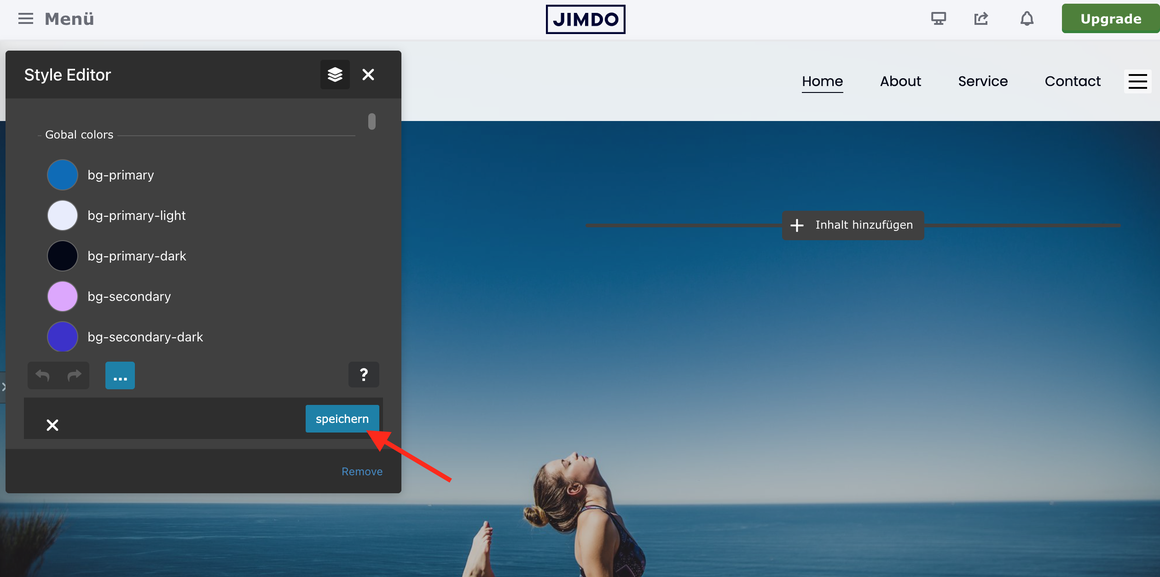
Once you have pasted the code into the Source Code popup, click the Save button. After a few seconds, the module will disappear. At the top of the page, open the Matrix Toolbar and click the Style Editor button to view your table inside the Style Editor popup. Finally, click Save to confirm the installation.

Troubleshooting
Please add the comment below to describe the problem.