Widget Library
The Matrix Widgets Library enables editors to seamlessly insert pre-built HTML widgets into HTML/Widget modules, customize their styles, and preview changes in real time—making the editing process faster, more efficient, and user-friendly.
How to use
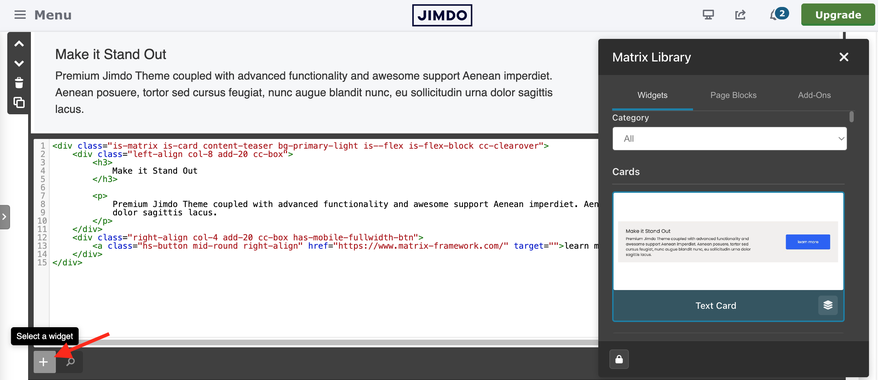
Open the “Widget/HTML” module, then click the plus button at the bottom of the module settings to open the Matrix Widgets Library popup. From there, select a widget and preview different style variations in real time.
How to activate
In the MatrixConfig object set matrixLibrary: true
matrixLibrary: true Ensure that the file matrix-library.matrix.js has been properly uploaded to your website
Each widget includes multiple variants. Click the “Variant Styles” button to view all available options for the selected widget.

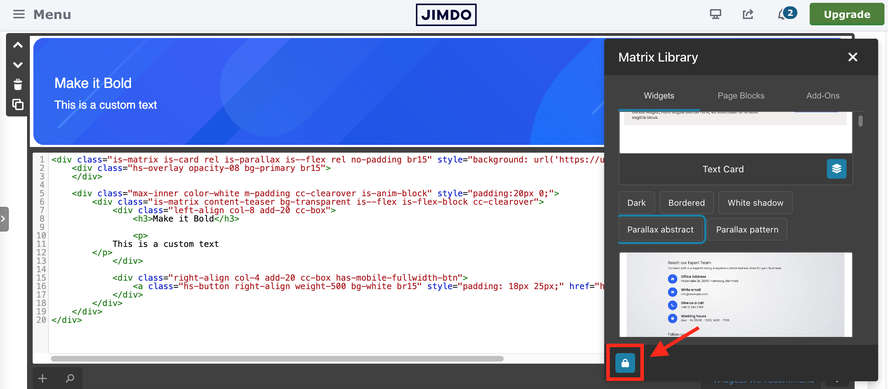
Lock content button
A footer button “Lock content” (same pattern as template selection’s Lock Global Colors / Lock Custom CSS). When on, pasting a widget into a module that already has content replaces only the structure and keeps your current content (images, headings, link URLs/text, paragraphs, spans and other inlines). Lets you try different styles for the same content.
If you have encountered any bugs, errors, or unexpected behavior, please leave a comment below.