Safe Mode
A one-click shortcut in the Matrix sliding admin menu that reloads the Jimdo editor in Safe Mode — so you can repair or remove broken HTML widgets without their scripts crashing the editor. Matrix Head code and the admin menu keep working; only per-widget embeds go inert.
Overview
Jimdo's editor includes a built-in recovery mode called Safe Mode (?cmsEdit=1&safemode=1). Matrix Framework adds an optional Safe mode item
to the sliding admin menu so you can enter it without editing the address bar.
- One click from the Matrix admin menu — no URL editing
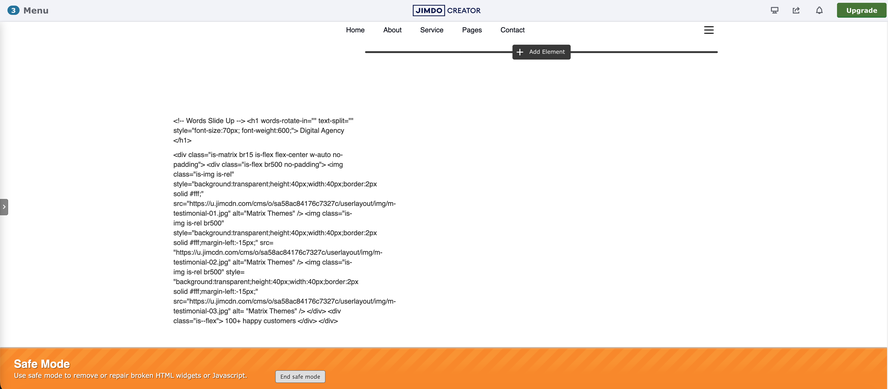
- HTML / embed widgets render as inert source text so broken scripts can't choke the editor
- Site-wide Head / Footer code (including Matrix) still runs — the menu and Hub stay available
-
Opt-in only — hidden until you set
features.safeMode: true - Exit with Jimdo's own banner button — Matrix does not add a second exit control
1 What it disables
Safe Mode is targeted, not a global JavaScript kill switch. Knowing what still runs (and what doesn't) avoids confusion when Variables, previews, or embeds look “broken” while you're repairing them.
Disabled in Safe Mode
- Per-widget HTML / embed modules (
j-htmlCode) -
<script>tags inside those widgets — shown as plain source, not executed - Live DOM from widget markup (e.g. a
<var>tag appears as text)
Still runs in Safe Mode
- Site-wide Head custom code (where
matrix.jsloads) - Site-wide Footer custom code
- Matrix sliding admin menu and Matrix Hub
- Jimdo's own editor chrome and the Safe Mode banner
| Code location | Normal edit | Safe Mode |
|---|---|---|
| Head / Footer custom code | Runs | Still runs |
| HTML / Widget module scripts | Run / rendered | Inert plain-text source |
| Published public page | Unaffected | Unaffected (admin only) |
Why Variables look like plain text
A tag like <var>wow is-folded-left</var> lives inside an HTML widget. In Safe Mode that widget is rendered as inert text — there is no real
<var> node for Variable Preview to read. The Variables feature itself is not disabled; the widget it would read was turned into text so you can edit it safely.
2 Getting started
Safe Mode is opt-in. Upload the updated admin menu, then flip the feature flag in Head.
Upload admin-menu.matrix.js
From Matrix Framework v1.7.6+, upload dist/admin-menu.matrix.js (replace the file already linked from your Head / Footer).
Enable the flag in Head
Add safeMode: true to the same inline MatrixConfig block that holds matrixAdmin: true — not only in the repo's
matrix-config.js.
Reload the editor
Hard-refresh the Jimdo editor. Open the sliding admin menu — Safe mode appears between Custom layout and Upgrade.
<script type="text/javascript">
var MatrixConfig = {
  features: {
    matrixAdmin: true,
    safeMode: true
    // …other flags
  }
};
</script>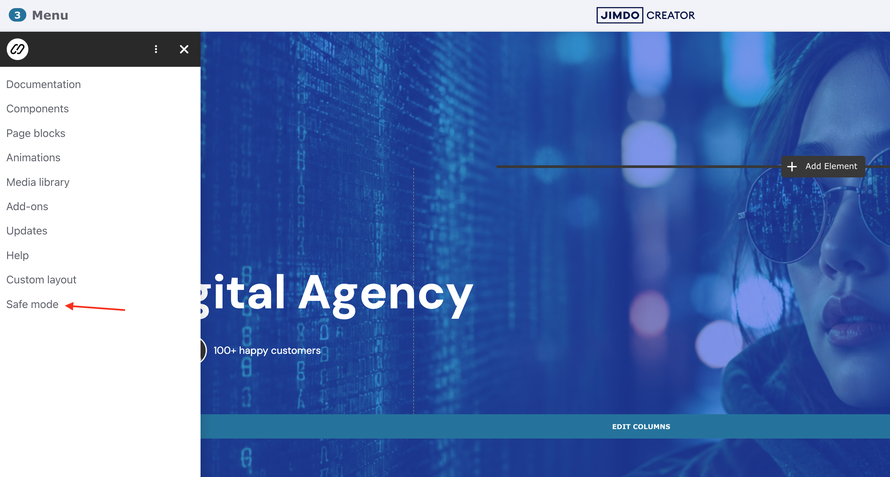
3 Using Safe Mode
Enter
In the Jimdo editor, open the Matrix sliding admin menu and click Safe mode. The editor reloads with safemode=1 added to the current URL (for example
?cmsEdit=1&safemode=1). Jimdo shows a banner explaining you can repair or remove broken HTML widgets or scripts.
Repair
Open the broken HTML / Widget module. Its markup appears as editable source instead of executing. Fix the syntax, remove a bad script, or delete the module entirely — then save.
Exit
Click Jimdo's own Exit safe mode button on the banner. Matrix intentionally does not add a second exit link — leaving Safe Mode is Jimdo's URL round-trip to own.
4 How it works
The shortcut ships in admin-menu.matrix.js. When features.safeMode is true (on either MatrixConfig or legacy MatrixPluginToolkitConfig),
the menu renders a Safe mode link that reloads the Jimdo admin shell — not merely the content iframe.
-
Finds the same-origin ancestor window that contains
#siteadmin(the URL in the address bar) -
Sets
safemode=1on that URL while keepingcmsEdit=1 - Assigns the new location so the editor reloads into Safe Mode
Navigating with window.top alone can fail when Jimdo nests the admin inside a cross-origin wrapper — Matrix climbs the frame chain to the correct admin window instead.
| State | Result |
|---|---|
safeMode unset / false
|
No menu item (default) |
safeMode: true
|
Safe mode appears in the sliding admin menu |
| Click Safe mode |
Editor reloads at ?cmsEdit=1&safemode=1; HTML-widget scripts inert
|
| Exit | Use Jimdo's Exit safe mode banner button |
| Public page | Never affected |
Configuration
Safe Mode defaults to off.
window.MatrixConfig = {
  features: {
    safeMode: false // Safe mode shortcut in sliding admin menu
  }
};
Set safeMode: true in the Head config on the live site to show the menu item. Requires matrixAdmin (or an equivalent admin menu load) so the sliding menu is present.
Troubleshooting
| Issue | Fix |
|---|---|
| Safe mode item doesn't appear |
Confirm features.safeMode: true is in the Head MatrixConfig, and that admin-menu.matrix.js from v1.7.6+ is uploaded. Hard-refresh the
editor.
|
| Click does nothing / URL snaps back |
Keep cmsEdit=1 in the URL. Navigating to ?safemode=1 alone makes Jimdo redirect and drop Safe Mode.
|
| Matrix Variables show as raw text | Expected in Safe Mode — the HTML widget is inert. Exit Safe Mode after repairing to restore live Variable Preview. |
| Head scripts still run and break the editor | Safe Mode does not disable Head / Footer code. Temporarily comment out the problematic Head script, or fix the HTML widget that is the actual culprit. |
| Need Safe Mode but the menu won't open |
Add &safemode=1 manually to the address bar while leaving cmsEdit=1 in place.
|