The latest updates of Matrix themes, including new features, bug fixes, and much more.
*This post was updated on May 22, 2025, with additional features and improvements.
01. matrix.js
The main JavaScript file has been updated with valuable new features specifically designed for Jimdo users. As you know, all Matrix themes include a fixed header. Previously, when adding anchor links, it was necessary to leave additional top spacing to prevent the anchor section from being obscured by the header.
With this latest update, that issue is resolved: your anchor sections will now automatically adjust to the header height, ensuring smooth navigation without any manual adjustments.
Key improvements:
- Anchor links now accurately navigate to their respective sections, with no risk of overlap by the header.
- For users of the "Catalog" module, store items will open correctly, maintaining the proper top spacing regardless of the header height.
Variable tag for background image
The latest version of Matrix-min.js introduces additional customizations using the <var> tag - including the ability to add a background image. Let’s take a closer look at a simple example.
To use the <var> tag, start by adding a Columns module. Inside it, insert a Widget/HTML module, where you can include any helper or utility classes for background colors, padding, border radius, and more.
Once configured, simply click the Style Editor icon in the top-left corner and select "Apply the styles" to instantly see the changes - no page reload required.
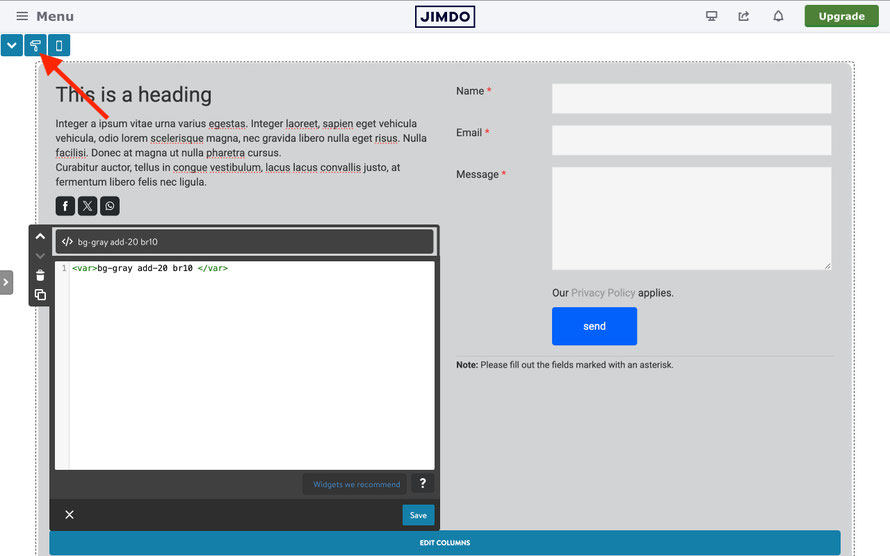
Now you can add a background image using the <var> tag by simply writing:
bg-img:+image-url

Important!
- You’ll need to reload the page to see the background image applied.
- Do not include any space between bg-img: and the image URL.
You can combine additional classes with bg-img:image-url to customize text color and apply other styles.
To modify the dark overlay background, you can use one of the following classes:
- has-primary-overlay
- has-secondary-overlay
- has-gradient-overlay
- has-white-overlay
02. JS Style Editor
The JavaScript of the Matrix Style Editor has been updated with a small but important adjustment for custom CSS. Now, regardless of where you copy the CSS from, it will be pasted as plain text only - automatically stripping out any background colors, text formatting, or other unwanted styles.
This improvement has also been applied to the template configuration options, allowing you to copy and paste any text without the risk of adding extra styling or hidden characters.

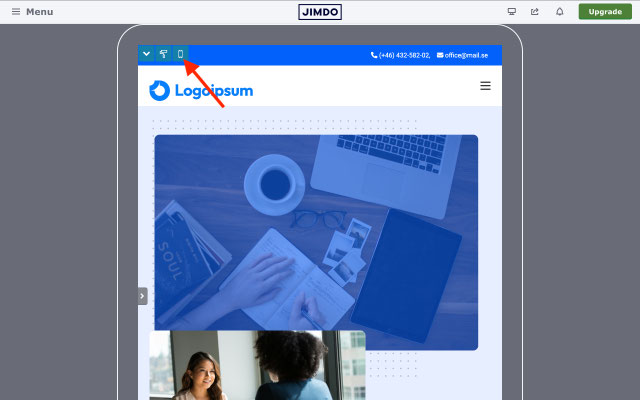
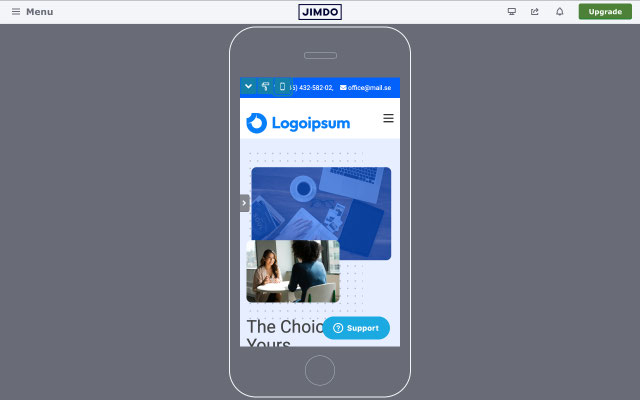
Another improvement has been made to the responsive preview feature, accessible via the device preview button in the Style Editor (top left corner, with the screen icon).
- The first click switches to tablet view.
- The second click shows the mobile view.
- The third click returns to the desktop view.
This allows you to quickly see how your website looks on different devices - all without leaving the editor.
03. Style Editor Icons

Jimdo has recently updated the Twitter (X) icon in the "Share Icons" module. As a result, the UI icons - particularly in the Style Editor’s top-left corner and in Fluid sections - have been affected and may appear misaligned or broken.
To resolve this issue, simply upload the latest version of the CSS files '09.updates.css' and '10.style-editor.css', available in the "Updates" section. This update will restore proper icon display and fix the related visual errors.
04. New Add-ons
In the Matrix Admin Menu under the Add-ons section, you will now find three new features.
1. Gradients
This feature introduces enhanced gradient options for Matrix themes. New utility classes make it easy to customize and apply gradient styles to various elements of your website, including:
- Gradient headings and text
- Gradient borders
- Gradient backgrounds
- Gradient animations
- Gradient outlined buttons
Suspendisse potenti. Vivamus non arcu tincidunt, congue massa at, porttitor velit. Curabitur lacinia nisl ut turpis convallis, at dictum urna aliquet. Nullam non urna eget felis interdum feugiat. Morbi vel neque elit. Nullam a luctus leo. Integer maximus sapien in bibendum scelerisque.
2. Inset cards
This add-on includes 12 custom widgets called Inset Cards, featuring unique designs with negative border radius - a cutting-edge design trend now seen on many modern websites. With this feature, you can easily incorporate these stylish cards into your own website to enhance its visual appeal and layout.
The choice is yours
The answer awaits in the depths of your own resolve.
3. New Sticky Animations
Sticky Animations allow you to fix any element in place on your page until it is dynamically "unstuck" by another element as you scroll. These animations can be applied within columns or as standalone modules, giving you greater control over interactive and engaging layouts.
You can access this feature in the "Animations" section of the Matrix Themes Admin Menu.
The Icon Card title
Lorem ipsum dolor sit amet,sed diam nonumy eirmod tempor invidunt ut labore.
Read more
The Icon Card title 2
Lorem ipsum dolor sit amet,sed diam nonumy eirmod tempor invidunt ut labore.
Read more
The Icon Card title 3
Lorem ipsum dolor sit amet,sed diam nonumy eirmod tempor invidunt ut labore.
Read more
The Icon Card title 3
Lorem ipsum dolor sit amet,sed diam nonumy eirmod tempor invidunt ut labore.
Read more
05. New Page Blocks
In the "Page Blocks" section, new blocks have been added to provide even more layout and design options for your pages.
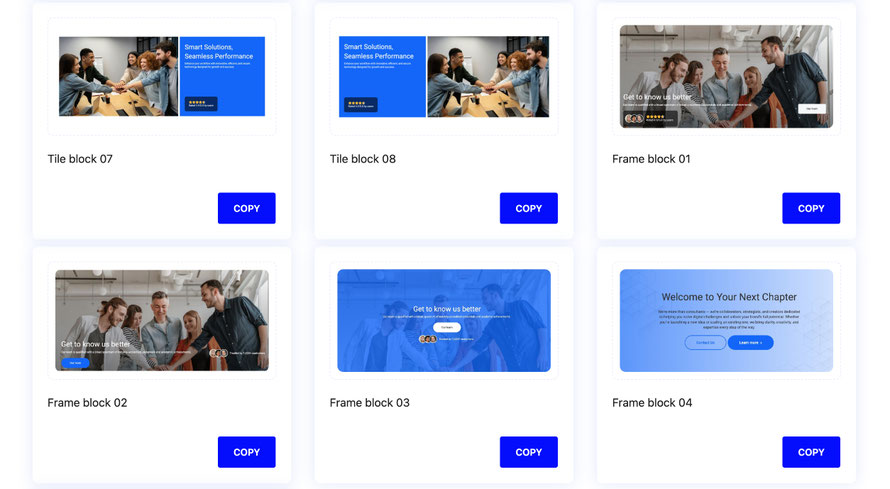
The following new blocks have been added:
- Tile Block: Two new design variations for the tile block, offering fresh layout options.
- Frame Block: Full-width sections featuring margins on the left and right sides, with customizable border-radius styles for a sleek, modern look.
- About Block: A dedicated section designed to help you easily add introductory content - perfect for setting up the first elements of your website.
06. Updated templates
All Matrix Themes have recently been updated with the latest features and a refreshed design. You'll discover a completely redesigned theme with a modern look, enhanced functionality, and numerous improvements to ensure your website stays current, stylish, and user-friendly.

07. Advanced Text Animations
The Advanced Text Animations, powered by the GSAP library, enable you to add stunning, easily customizable text animations to your Jimdo website.
Important! The GSAP library is not bundled with the Matrix theme or any add-ons due to licensing restrictions. While GSAP is free to use for personal and client projects, incorporating it into a distributed theme or add-on requires a commercial license. Therefore, GSAP can be integrated directly into your own or a client’s website but is not included as part of the Matrix package.
The code provided below are available for all Jimdo users and do not require any external code dependencies, ensuring a smooth and straightforward implementation.
<!-- Include GSAP and plugins -->
<script src="https://cdn.jsdelivr.net/npm/[email protected]/dist/gsap.min.js"></script>
<script src="https://cdn.jsdelivr.net/npm/[email protected]/umd/index.min.js"></script>
<script src="https://cdnjs.cloudflare.com/ajax/libs/gsap/3.12.2/ScrollTrigger.min.js"></script>
<script>
/* <![CDATA[ */
(function($) {
  $(document).ready(function() {

    gsap.registerPlugin(ScrollTrigger);

    // Split text into spans for elements with the attribute [text-split]
    function initSplitType(selector) {
      $(selector).each(function() {
        new SplitType(this, {
          types: "words, chars",
          tagName: "span"
        });
      });
    }

    // Reusable function to create scroll triggers
    function createScrollTrigger(triggerElement, timeline, options = {}) {
      ScrollTrigger.create({
        trigger: triggerElement,
        start: options.start || "top 60%",
        end: options.end || "bottom top",
        onEnter: () => timeline.play(),
        onLeaveBack: () => timeline.reverse()
      });
    }

    // Animation functions
    function animateWordsSlideUp() {
      $("[words-slide-up]").each(function () {
        let tl = gsap.timeline({ paused: true });
        tl.from($(this).find(".word"), {
          opacity: 0,
          yPercent: 100,
          duration: 0.5,
          ease: "back.out(2)",
          stagger: { amount: 0.5 }
        });
        createScrollTrigger(this, tl);
      });
    }

    function animateWordsRotateIn() {
      $("[words-rotate-in]").each(function () {
        let tl = gsap.timeline({ paused: true });
        tl.set($(this).find(".word"), { transformPerspective: 1000 });
        tl.from($(this).find(".word"), {
          rotationX: -90,
          duration: 0.6,
          ease: "power2.out",
          stagger: { amount: 0.6 }
        });
        createScrollTrigger(this, tl);
      });
    }

    function animateWordsSlideFromRight() {
      $("[words-slide-from-right]").each(function () {
        let tl = gsap.timeline({ paused: true });
        tl.from($(this).find(".word"), {
          opacity: 0,
          x: "1em",
          duration: 0.6,
          ease: "power2.out",
          stagger: { amount: 0.2 }
        });
        createScrollTrigger(this, tl);
      });
    }

    function animateLettersSlideUp() {
      $("[letters-slide-up]").each(function () {
        let tl = gsap.timeline({ paused: true });
        tl.from($(this).find(".char"), {
          yPercent: 100,
          duration: 0.2,
          ease: "power1.out",
          stagger: { amount: 0.6 }
        });
        createScrollTrigger(this, tl);
      });
    }

    function animateLettersSlideDown() {
      $("[letters-slide-down]").each(function () {
        let tl = gsap.timeline({ paused: true });
        tl.from($(this).find(".char"), {
          yPercent: -120,
          duration: 0.3,
          ease: "power1.out",
          stagger: { amount: 0.7 }
        });
        createScrollTrigger(this, tl);
      });
    }

    function animateLettersFadeIn() {
      $("[letters-fade-in]").each(function () {
        let tl = gsap.timeline({ paused: true });
        tl.from($(this).find(".char"), {
          opacity: 0,
          duration: 0.2,
          ease: "power1.out",
          stagger: { amount: 0.8 }
        });
        createScrollTrigger(this, tl);
      });
    }

    function animateLettersFadeInRandom() {
      $("[letters-fade-in-random]").each(function () {
        let tl = gsap.timeline({ paused: true });
        tl.from($(this).find(".char"), {
          opacity: 0,
          duration: 0.05,
          ease: "power1.out",
          stagger: { amount: 0.4, from: "random" }
        });
        createScrollTrigger(this, tl);
      });
    }

    function animateScrubEachWord() {
      $("[scrub-each-word]").each(function () {
        let tl = gsap.timeline({
          scrollTrigger: {
            trigger: this,
            start: "top 90%",
            end: "top center",
            scrub: true
          }
        });
        tl.from($(this).find(".word"), {
          opacity: 0.2,
          duration: 0.2,
          ease: "power1.out",
          stagger: { each: 0.4 }
        });
      });
    }

    // Initialize SplitType and animations
    initSplitType("[text-split]");

    animateWordsSlideUp();
    animateWordsRotateIn();
    animateWordsSlideFromRight();
    animateLettersSlideUp();
    animateLettersSlideDown();
    animateLettersFadeIn();
    animateLettersFadeInRandom();
    animateScrubEachWord();

    // Avoid flash of unstyled content
    gsap.set("[text-split]", { opacity: 1 });
    // Apply overflow: hidden to .word elements
      $(".word").css("overflow", "hidden");
  });
})(jQuery);
/*]]>*/
</script>
<div class="matrix-msg invisible">
    GSAP animations
</div>
Adding animations
You can apply animations to any text, headings (as shown in the example below), or simply wrap any element you wish to animate.
<p words-slide-up="" text-split="">
   Whatever it is, the way you tell your story online can make all the difference
</p>
All available options:
- words-slide-up="" text-split=""
- words-rotate-in="" text-split=""
- words-slide-from-right="" text-split=""
- letters-slide-up="" text-split=""
- letters-slide-down="" text-split=""
- letters-fade-in="" text-split=""
- letters-fade-in-random="" text-split=""
- scrub-each-word="" text-split=""
Write a comment