Skip to content
  • Home
  • Features
    • Matrix Framework
    • Matrix One
    • Plugin Toolkit
    • Matrix Library
  • Templates
  • Support
  • Pricing
  • Home
  • Features
    • Matrix Framework
    • Matrix One
    • Plugin Toolkit
    • Matrix Library
  • Templates
  • Support
  • Pricing
    21. October 2023

    Matrix themes - Updates #11

    Explore the latest updates of Matrix Themes: New features, bug fixes, and more. Discover further customizations of custom widgets with live examples.


    01. General

    Matrix add-ons, including extra plugins and widgets, are now conveniently grouped in one location. Say goodbye to searching across multiple pages or sections in Matrix themes. Simply head to the 'Add-ons' section in the Matrix themes admin menu to effortlessly select your desired widgets for your site.
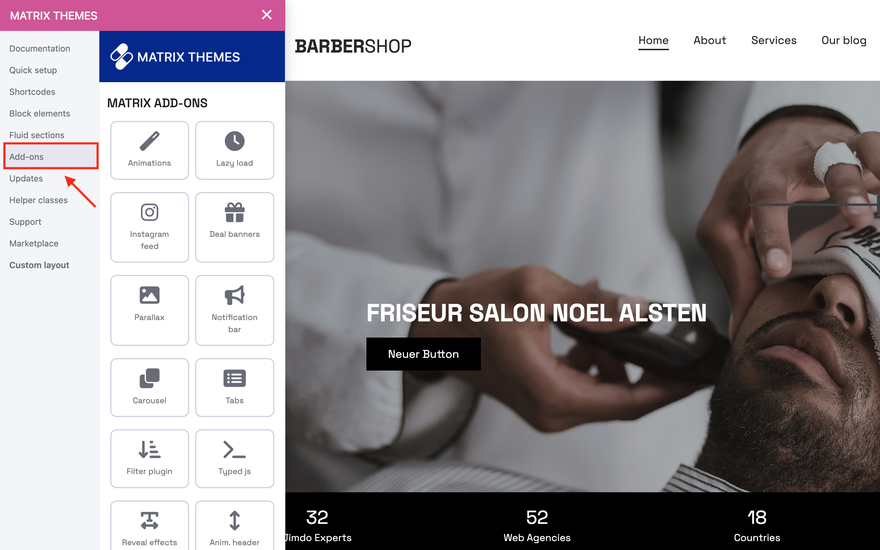
    Matrix themes add-ons
    add-5 bg-white has-shadow

    02. Bug Fixes

    The most recent updates of Matrix Themes and Page Builder feature a bug fix for the style editor buttons on the Safari browser. In earlier versions, two buttons, 'Apply Styles' and 'Mobile View,' were not visible. Now, these functions work seamlessly across all browsers, including Safari, where the Style Editor displays slightly different styles.

    Matrix themes add-ons
    add-5 bg-white has-shadow

    03. Font Awesome

    The Matrix Themes include now the updated version 6.4.2 of the Font Awesome framework, featuring an array of new icons and styles

    04. Fluid Sections

    The most significant update of the year - Fluid Sections now come with a host of new features, simplifying and adding enjoyment to site editing. You can now relish the opportunity for customizations without any coding. To guide you through the process, I've organized the information as follows:

    • Why Fluid Sections?
    • How to Edit
    • New Features
    • Notes
    Youtube content is not displayed due to your cookie settings. Click on the functional YouTube cookies in the cookie banner to agree to load and display content from YouTube.


    Why Fluid Sections?

    After testing numerous website builders like Squarespace, Duda, Wix, Webflow, Elementor, and many others, I aim to integrate the best features into Jimdo while maintaining the fundamental concept of effortless and enjoyable editing without the necessity of coding.


    How to edit

    Upon initial installation, I observed that several users are using Fluid sections incorrectly. Instead of pasting the code into the 'TEXT' module, they are placing it in the 'Widget/HTML' module.

    While both methods display elements correctly, there exists a significant distinction: the 'Widget/HTML' module lacks the functionality for editing widget elements via drag, resize, and color settings. Thus, it is imperative to use Fluid sections within the 'TEXT' module.


    New Features

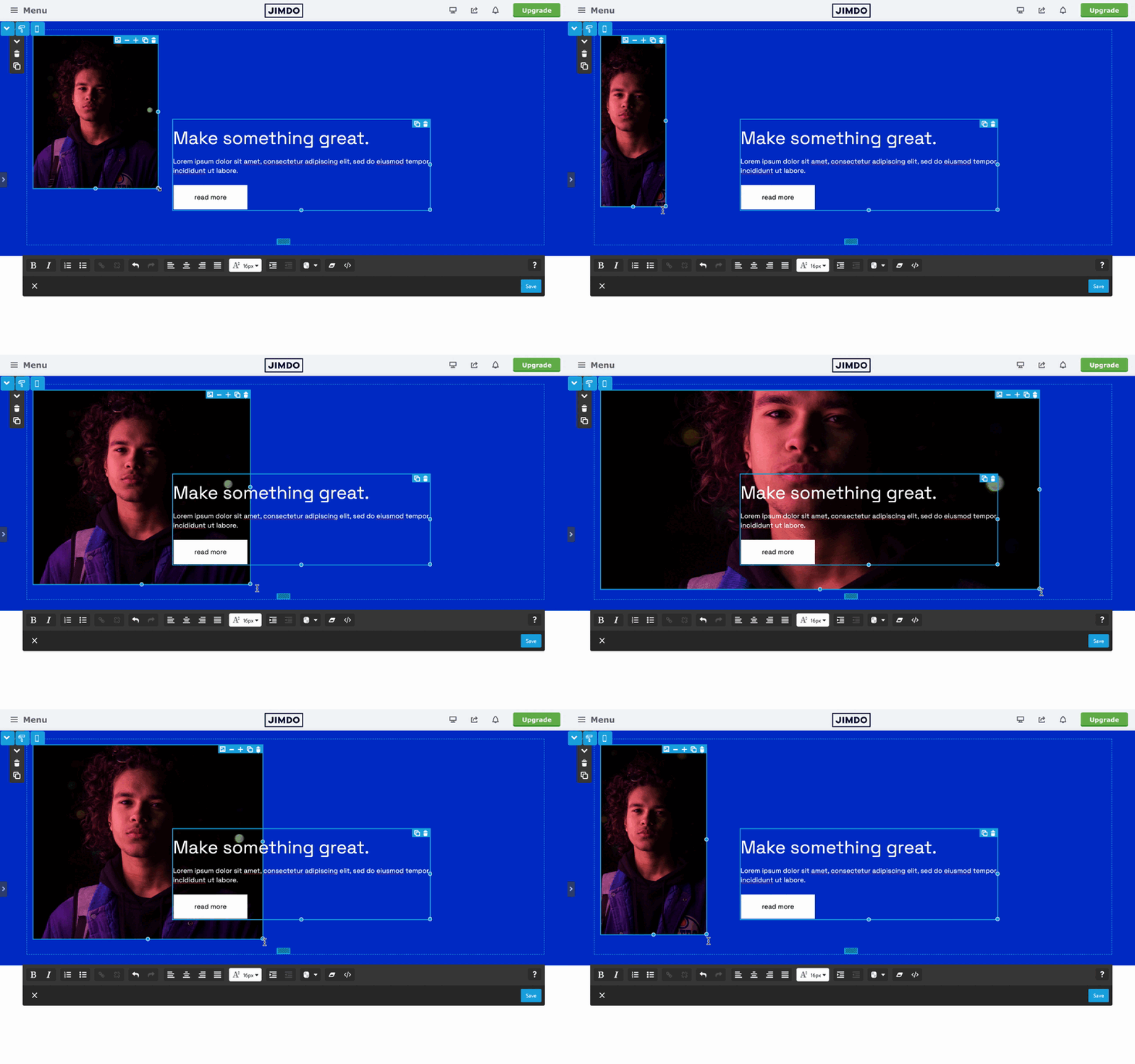
    - Fluid Images.

    With fluid images, you can now effortlessly resize images within fluid sections, altering both the image size and ratio.
    add-5 bg-white has-shadow


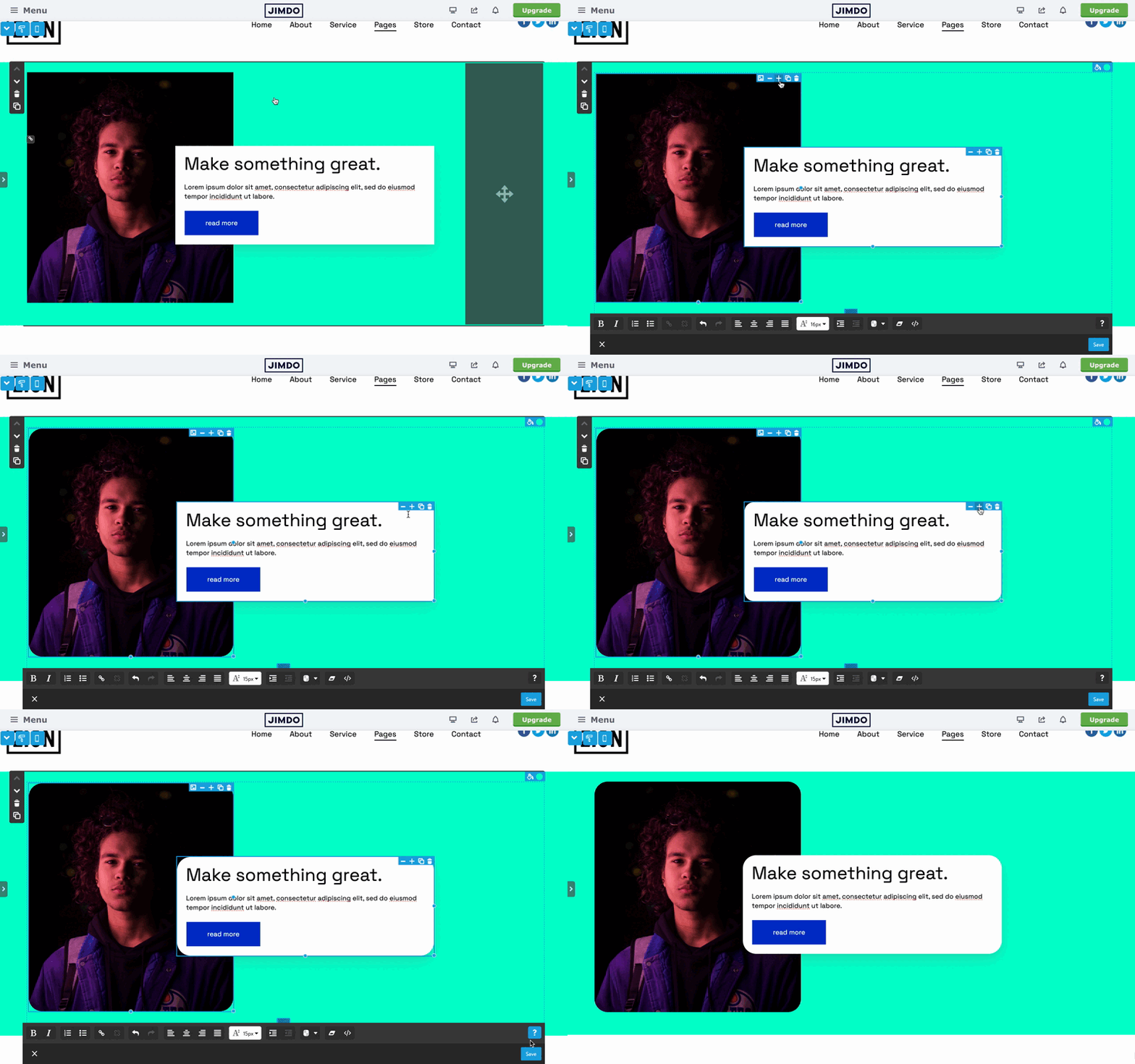
    - Change the border radius

    The new fluid sections now offer the option to add border radius to images and simple text sections. Each module is equipped with '+' and '-' buttons, allowing users to adjust the border radius as needed.
    add-5 bg-white has-shadow


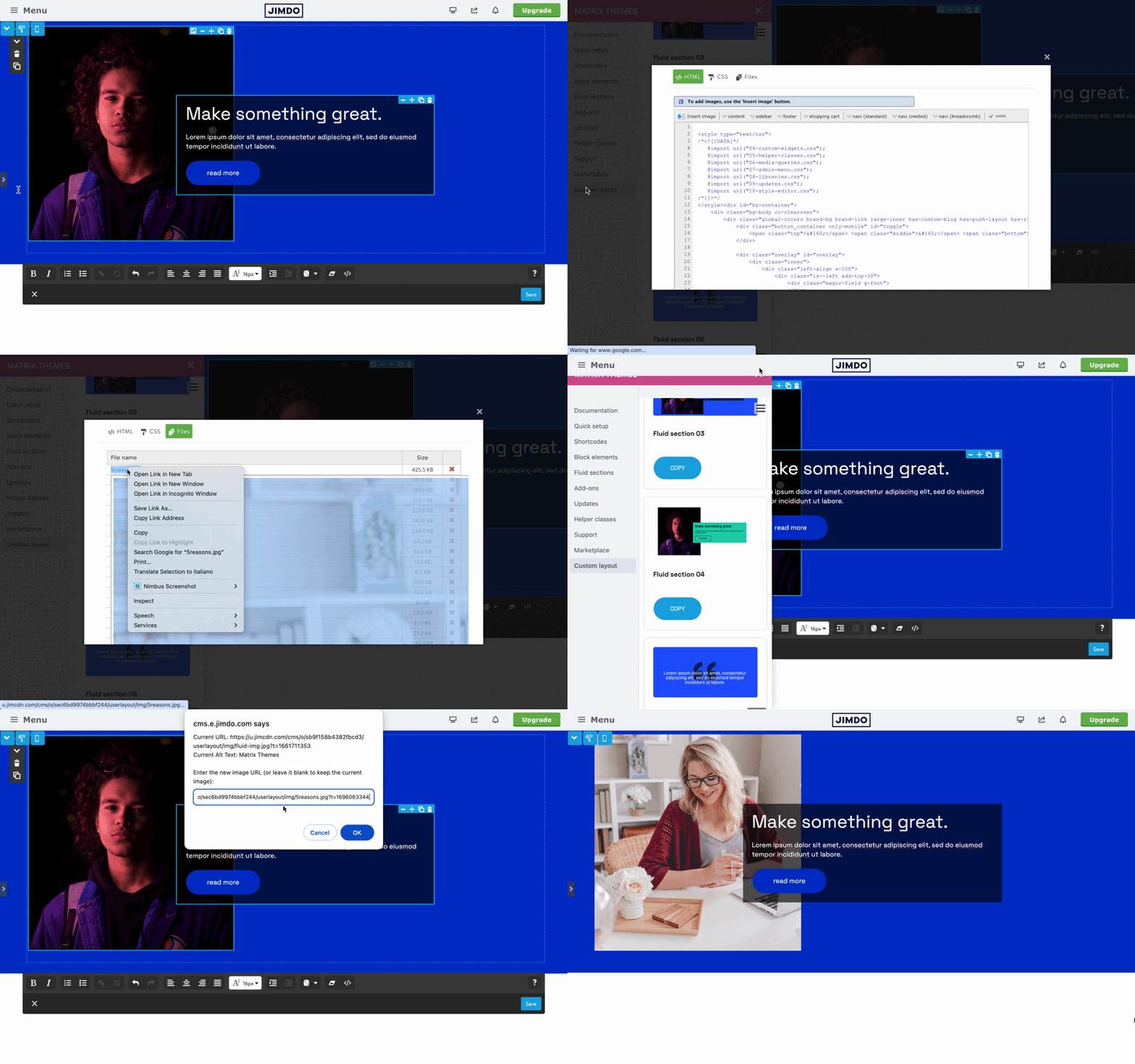
    - Change the image URL and ALT Text

    Another significant new feature allows for easy image replacement in Fluid Sections without the need to edit HTML. Simply click the image icon and paste the new image URL from your files folder. Furthermore, you now have the option to modify the image alt text.
    add-5 bg-white has-shadow


    - Editing the text

    To activate the editing mode, simply double-click on a text and begin editing. To reactivate the resizing and dragging option, click outside the fluid section. If you encounter issues such as non-draggable elements or the absence of the resizing option after copying fluid elements, click the 'Apply the Styles' button in the style editor.


    Notes

    Unfortunately, the newly introduced features of Fluid Sections cannot be used in previously added widgets on your site. You will need to use the updated widgets accessible from the Matrix Themes admin menu > Fluid Sections.

    05. How to update

    To update your website with the latest features, follow these steps:

    • In the Matrix Themes admin menu, navigate to the updates section. Download all CSS files, Font Awesome icons, and the 'matrix-min.js' file, and then upload them to your website.
    • Under the 'Quick Setup' section, access the Style Editor and update the JavaScript portion in the Widget/HTML.
    • Once again, please note that if you are currently using an outdated Matrix theme or a template that was installed without the Style Editor, you can require a new installation from the 'Support' page.


    tagPlaceholderTags:
    Get started
    Gobal colors
      bg-primary
      bg-primary-light
      bg-primary-dark
      bg-secondary
      bg-secondary-dark
    Template colors
      body
      top-header
      top-header-inner
      header
      header-inner
      navigation-inner
      navigation color
      dropdown background color
      content
    Footer Styles
      background
      text color
      link color
      horizontal line
    Buttons
      style 1
      style 2
      style 3
      text color
    Mobile navigation
      background color
      navigation color
    Other elements
      social icons
      top header border
      header border
      nav inner border
      footer border
     
    Template configurations
     
    has-sticky-logo has-large-header primary-font has-center-nav has-header-blur no-shopping-cart
     
    Top header inner


    Header inner


    Navigation inner


    Navigation styles
     
    size-15 weight-400
     
    Sub-menu (breadcrumbs) styles
     
    size-15
     
    Mobile Navigation styles
     
    size-30
     
    Content styles
     
    form-white
     
    Footer styles
     
    o-form has-thin-border has-border-style-solid has-border-top has-footer-border-color
     
    Footer background image


    Typography

    Heading H1
    weight-400
     
    Heading H2
    weight-400
     
    Heading H3
    weight-400
     
    Body text (p, table, td)
     
     
    Buttons
    weight-400
     
     
    Advanced settings
     
    Custom CSS

    #cc-inner .my-class {

    color:#f0f0f0;

    }

    /* MATRIX-CUSTOM-MODULES-START */

    #cc-m-7792741551 h1, #cc-m-7792741551 h2, #cc-m-7792741551 h3 {font-size:20px !important;}

    #cc-m-7792741851 h1, #cc-m-7792741851 h2, #cc-m-7792741851 h3 {font-size:20px !important;}

    #cc-m-7792930551 h1, #cc-m-7792930551 h2, #cc-m-7792930551 h3 {font-size:20px !important;}

    #cc-m-12388126494 h1, #cc-m-12388126494 h2, #cc-m-12388126494 h3 {font-weight:600 !important;}

    #cc-m-12388126494 h1, #cc-m-12388126494 h2, #cc-m-12388126494 h3 {font-size:40px !important;}

    /* MATRIX-CUSTOM-MODULES-END */

    /* MATRIX-GLOBAL-SETTINGS-START */

    :root {

    --content-width: 1170px;

    --special-pages-content-width: 900px;

    }

    /* HAMBURGER-BAR-START */

    :root { --hamburger-btn-background: transparent; --hamburger-btn-bg: transparent; --hamburger-btn-bg-active: transparent; }

    /* HAMBURGER-BAR-END */

    #cc-inner #hs-container .j-formnew input[type='submit'],

    #cc-inner #hs-container input.submitUser,

    #cc-inner .hs-button,

    #cc-inner .j-calltoaction-link,

    #cc-inner input.cc-checkout-btn,

    #cc-inner a.cc-shop-addtocard {

    padding: 14px 35px !important;

    border-radius: 8px;

    }

    /* MOBILE-FULLWIDTH-BUTTONS-START */

    @media only screen and (width <= 746px) {

    #cc-inner #hs-container .j-formnew input[type='submit'],

    #cc-inner #hs-container input.submitUser,

    #cc-inner .hs-button,

    #cc-inner .j-calltoaction-link {

    width: 100% !important;

    margin: 5px auto 0 auto;

    box-sizing: border-box;

    text-align: center !important;

    }

    }

    /* MOBILE-FULLWIDTH-BUTTONS-END */

    /* MATRIX-GLOBAL-SETTINGS-END */


    Note:
    All changes made here will be applied to your entire website.
    draggable-logo

    Build faster, smarter, and more flexible Jimdo websites.

    has-right-col-border

    Products

    Matrix Framework

    Matrix One

    Matrix Plugin Toolkit

    Resources

    Support

    Changelog

    Showcase

    Marketplace

    Community

    Blog

    Archive

    GitHub


    About | Privacy Policy | Cookie Policy | Sitemap | Withdraw contract
    Created with Jimdo
    Log in Log out | Edit
    • Scroll to top
    Close