Skip to content
  • Home
  • Features
    • Matrix Framework
    • Matrix One
    • Plugin Toolkit
    • Matrix Library
  • Templates
  • Support
  • Pricing
  • Home
  • Features
    • Matrix Framework
    • Matrix One
    • Plugin Toolkit
    • Matrix Library
  • Templates
  • Support
  • Pricing
    01. May 2022

    Matrix themes - Updates #02

    The latest updates of Matrix Themes including the new features, bug fixes and much more.

    You will also find some further customizations  of custom widgets with the live examples.

    01. JS

    Download
    Matrix-1.9.3
    Includes the bug fix for Firefox browser
    matrix-1-9-3-slim.js
    js File 168.5 KB
    Download

    The Matrix Themes admin menu stopped working in the latest versions of Firefox browser when you're able to open the admin menu but can't select any element from the iframe. The problem occurs with the fixed position and it's parent div with transform property.

    All you have to do is delete the previous version of Matrix js file and upload a new one.

    How does the new menu work?

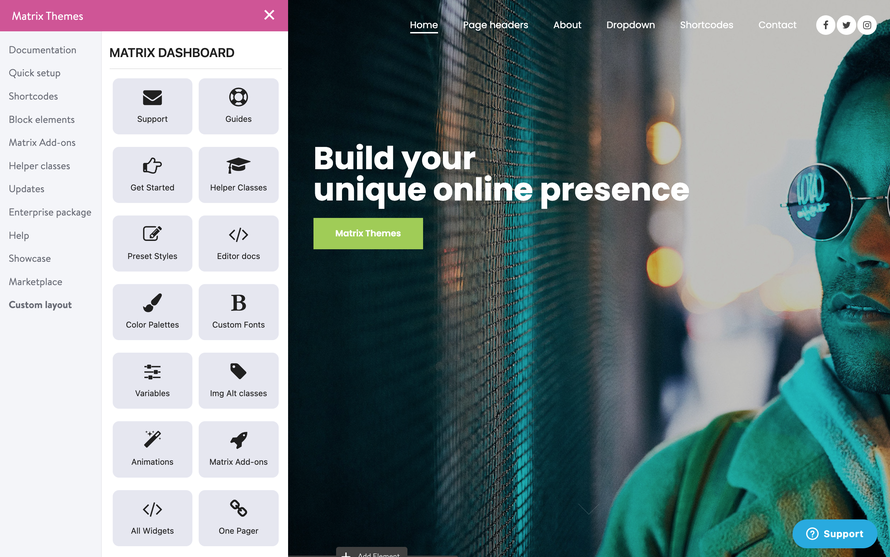
    When you click the button to open the Zodiac admin menu, the top bar of Jimdo menu disappears. Closing the Zodiac menu, it will appear again.
    bg-lightgray add-5

    02. Style editor updates

    add-5 bg-lightgray

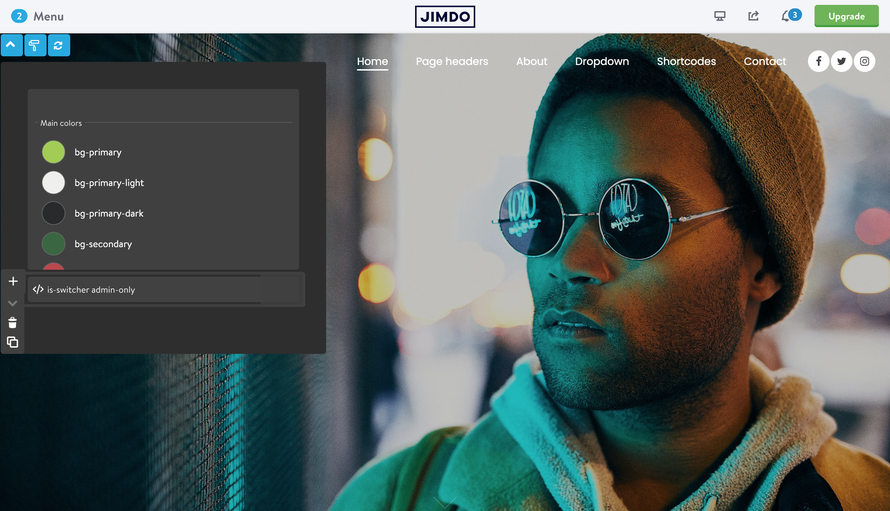
    The new Style Editor design allows you to edit the module 'Columns' inside the other columns and having the edit tools visible now, you can move the elements inside the editor to the top or bottom, remove or add the new ones.

    The variables is-switcher have been added to the second Widget/HTML module, together to the JS code, so the new style editor components are only 2 modules,- 'Tables' with the color palettes and 'Widget/HTML' with JS code and variable tag.

    Three buttons on the top left of the page are:

    1. Open/close the style editor.

    2. Apply the new styles of the editor.

    3. Refresh the page ( iframe) useful when you're using the variable tags to see the changes.

    03. Helper classes

    Updated helper classes of Matrix Themes. You will find some new classes for the global text and headings.

    Global text size for mobile

    m-text-11

    m-text-12

    ...

    m-text-20

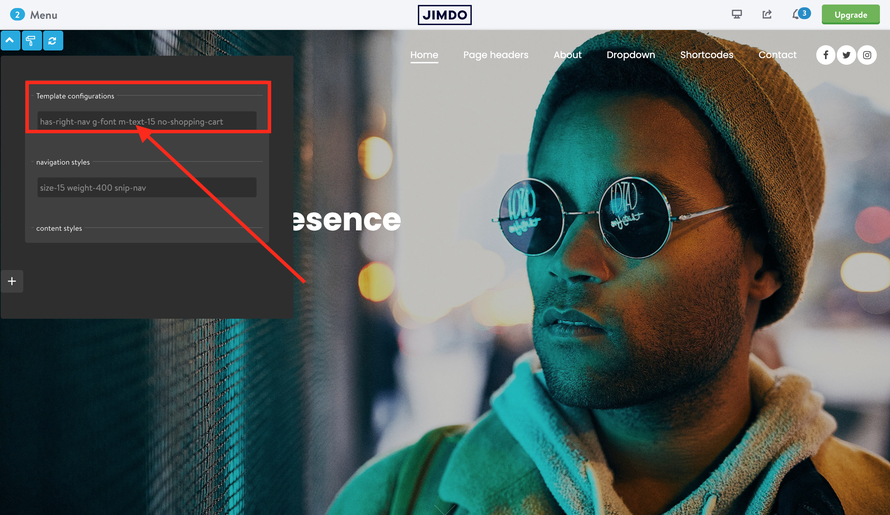
    In Design> Font settings you can setup the global text and heading size. In the style editor you can add the additional classes to make the global text smaller only for mobile devices
    add-5 bg-lightgray

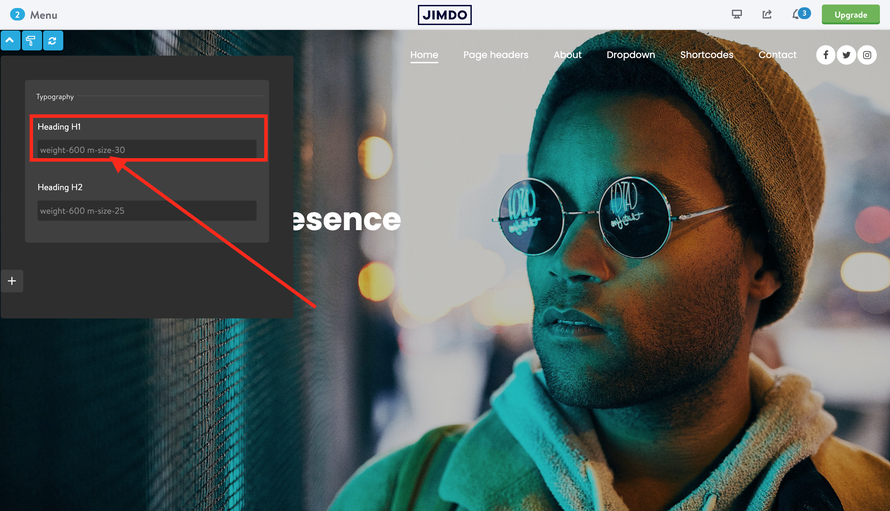
    Global headings size for mobile

    m-size-11

    m-size-12

    m-size-13


    ...

    m-size-20

    m-size-25

    m-size-30

    m-size-35

    m-size-40

    m-size-45

    m-size-50

    m-size-55

    m-size-60
    add-5 bg-lightgray

    04. J-Parallax

    The image parallax has been always been a "pain" for cross browser compatibility as it might work very well in Chrome and incorrect in Safari browser. In admin menu> Matrix Add-ons you will find a new parallax widget 'J-Parallax' that works fine in all browsers and mobile devices.

    It's available in two versions - left and center aligned caption.


    The new widget doesn't require any update of Matrix Theme as it has inline CSS and CDN js file

    
    <style>
     /*<![CDATA[*/
      .jarallax{position:relative;z-index:0}.jarallax>.jarallax-img{position:absolute;object-fit:cover;top:0;left:0;width:100%;height:100%;z-index:-1} 
     /*]]>*/
    </style>
    <script src="https://unpkg.com/[email protected]"></script>

    You can edit the speed transition of your parallax widget

    
    <script type="text/javascript">
    //<![CDATA[
         jQuery.noConflict();  
    (function($) {  
    // Init 
    $(document).ready(function() {
    
    // j-parallax
    $('.jarallax').jarallax({
      speed: 0.2,
    });
    
    });
    })(jQuery); 
    //]]>
    </script>


    Full widget shortcode

    
    <style>
        /*<![CDATA[*/
      .jarallax{position:relative;z-index:0}.jarallax>.jarallax-img{position:absolute;object-fit:cover;top:0;left:0;width:100%;height:100%;z-index:-1} 
        /*]]>*/
    </style><script src="https://unpkg.com/[email protected]"></script> 
    <script type="text/javascript">
    //<![CDATA[
         jQuery.noConflict();  
    (function($) {  
    // Init 
    $(document).ready(function() {
    
    // j-parallax
    $('.jarallax').jarallax({
      speed: 0.2,
    });
    
    });
    })(jQuery); 
    //]]>
    </script>
    <div class="is-fullwidth rel h-100 jarallax is--flex no-padding is-matrix-block">
        <img class="jarallax-img" src="https://u.jimcdn.com/cms/o/s66fcc108ff25abab/userlayout/img/j-parallax.jpg?t=1651309491" alt="Matrix themes" />
        <div class="hs-overlay opacity-8">
        </div>
    
        <div class="inner rel color-white m-padding cc-clearover" style="padding:250px 0;">
            <div class="col-6 left-align">
                <h3 class="">
                    Make things happen
                </h3>
    
                <p>
                    Look around and catch opportunities everywhere in order to clear your mind and take your abilities to the next level.
                </p>
                <br />
                <a class="hs-button ghost-white" href="https://www.matrix-themes.com/" target="_top">Read more</a>
            </div>
        </div>
    </div>


    tagPlaceholderTags: m-updates

    Write a comment

    Comments: 0
    Get started
    Gobal colors
      bg-primary
      bg-primary-light
      bg-primary-dark
      bg-secondary
      bg-secondary-dark
    Template colors
      body
      top-header
      top-header-inner
      header
      header-inner
      navigation-inner
      navigation color
      dropdown background color
      content
    Footer Styles
      background
      text color
      link color
      horizontal line
    Buttons
      style 1
      style 2
      style 3
      text color
    Mobile navigation
      background color
      navigation color
    Other elements
      social icons
      top header border
      header border
      nav inner border
      footer border
     
    Template configurations
     
    has-sticky-logo has-large-header primary-font has-center-nav has-header-blur no-shopping-cart
     
    Top header inner


    Header inner


    Navigation inner


    Navigation styles
     
    size-15 weight-400
     
    Sub-menu (breadcrumbs) styles
     
    size-15
     
    Mobile Navigation styles
     
    size-30
     
    Content styles
     
    form-white
     
    Footer styles
     
    o-form has-thin-border has-border-style-solid has-border-top has-footer-border-color
     
    Footer background image


    Typography

    Heading H1
    weight-400
     
    Heading H2
    weight-400
     
    Heading H3
    weight-400
     
    Body text (p, table, td)
     
     
    Buttons
    weight-400
     
     
    Advanced settings
     
    Custom CSS

    #cc-inner .my-class {

    color:#f0f0f0;

    }

    /* MATRIX-CUSTOM-MODULES-START */

    #cc-m-7792741551 h1, #cc-m-7792741551 h2, #cc-m-7792741551 h3 {font-size:20px !important;}

    #cc-m-7792741851 h1, #cc-m-7792741851 h2, #cc-m-7792741851 h3 {font-size:20px !important;}

    #cc-m-7792930551 h1, #cc-m-7792930551 h2, #cc-m-7792930551 h3 {font-size:20px !important;}

    #cc-m-12388126494 h1, #cc-m-12388126494 h2, #cc-m-12388126494 h3 {font-weight:600 !important;}

    #cc-m-12388126494 h1, #cc-m-12388126494 h2, #cc-m-12388126494 h3 {font-size:40px !important;}

    /* MATRIX-CUSTOM-MODULES-END */

    /* MATRIX-GLOBAL-SETTINGS-START */

    :root {

    --content-width: 1170px;

    --special-pages-content-width: 900px;

    }

    /* HAMBURGER-BAR-START */

    :root { --hamburger-btn-background: transparent; --hamburger-btn-bg: transparent; --hamburger-btn-bg-active: transparent; }

    /* HAMBURGER-BAR-END */

    #cc-inner #hs-container .j-formnew input[type='submit'],

    #cc-inner #hs-container input.submitUser,

    #cc-inner .hs-button,

    #cc-inner .j-calltoaction-link,

    #cc-inner input.cc-checkout-btn,

    #cc-inner a.cc-shop-addtocard {

    padding: 14px 35px !important;

    border-radius: 8px;

    }

    /* MOBILE-FULLWIDTH-BUTTONS-START */

    @media only screen and (width <= 746px) {

    #cc-inner #hs-container .j-formnew input[type='submit'],

    #cc-inner #hs-container input.submitUser,

    #cc-inner .hs-button,

    #cc-inner .j-calltoaction-link {

    width: 100% !important;

    margin: 5px auto 0 auto;

    box-sizing: border-box;

    text-align: center !important;

    }

    }

    /* MOBILE-FULLWIDTH-BUTTONS-END */

    /* MATRIX-GLOBAL-SETTINGS-END */


    Note:
    All changes made here will be applied to your entire website.
    draggable-logo

    Build faster, smarter, and more flexible Jimdo websites.

    has-right-col-border

    Products

    Matrix Framework

    Matrix One

    Matrix Plugin Toolkit

    Resources

    Support

    Changelog

    Showcase

    Marketplace

    Community

    Blog

    Archive

    GitHub


    About | Privacy Policy | Cookie Policy | Sitemap | Withdraw contract
    Created with Jimdo
    Log in Log out | Edit
    • Scroll to top
    Close