Skip to content
  • Home
  • Features
    • Matrix Framework
    • Matrix One
    • Plugin Toolkit
    • Matrix Library
  • Templates
  • Support
  • Pricing
  • Home
  • Features
    • Matrix Framework
    • Matrix One
    • Plugin Toolkit
    • Matrix Library
  • Templates
  • Support
  • Pricing
    25. April 2021

    Hero Image in Matrix Themes

    The new options for background image, it's title and advanced settings in Matrix themes

    How to add a background image

    In the admin menu, go to Design > Background, and click on the plus symbol to choose the desired background type.

    In the background section, you can choose to use an image, slideshow, YouTube video, or simply a background color.

    How do I set individual backgrounds add-5 bg-primary-light


    In Matrix themes, this feature by default has a value height "0," which means it's not visible unless you add the variables tag.

    • Select the page where you want to display the image background (Hero image).
    • Add a module "Columns" to content section.
    • Inside the "Columns," add the variable <var>draggable-hero</var>, and then click the "Apply the styles" button in the Style editor.
    • Now, you should see the "Columns" module inside the background image. By adding content or just a "Spacing" module, you can resize the image height to your preference.
    How do I set individual backgrounds add-5 bg-primary-light

    
    <var> draggable-hero color-white g-font </var>

    You can add additional classes such as color-white for white color text and g-font to use Google font

    How to make a transparent header

    To make a transparent header with absolute position, just add a class 'has-transparent-header' to the code of draggable hero:

    
    <var> draggable-hero color-white g-font has-transparent-header</var>

    How to make a fullscreen hero image

    
    <var> draggable-hero color-white g-font has-fullscreen-hero</var>

    How to add a bottom arrow

    With the same way you can display a bottom arrow (not clickable):

    
    <var> draggable-hero color-white g-font has-transparent-header has-btm-arrow </var>

    Inverted logo and nav color

    You can display the inverted color for the logo and navigation ( like in Lemberg theme)

    
    <var> draggable-hero has-nav-inverted has-logo-inverted color-white g-font has-transparent-header has-btm-arrow </var>

    Hero overlay

    In order to make your navigation or hero title well visible on hero image, this section has a black overlay. To remove it, go to Menu> Settings> Edit Head > select a page and add a body class 'no-hero-overlay'. This option is available only for Jimdo Pro or Business package which allows you to add a custom code or body class to individual pages
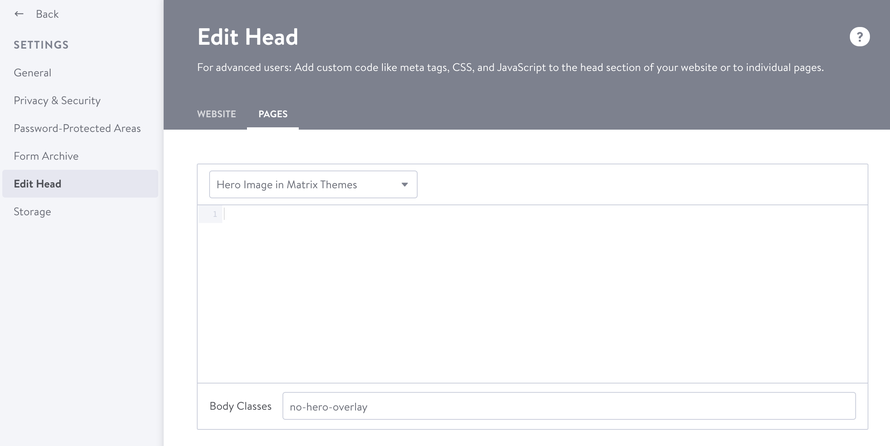
     

    How do I set individual backgrounds add-5 bg-primary-light

    How to display a custom widget instead of the hero image

    You can replace the default hero image on your website with any custom widget.

    Choose a widget from the 'Block elements' section, which contains full-width sections. Adding it as the first element in the content section allows you to eliminate the space between the header and content. To achieve this, add the class 'has-no-gutter' to the first line of the custom code.

    
    <div class="is-matrix-block has-no-gutter has-transparent-header...
    How do I set individual backgrounds add-5 bg-primary-light
    tagPlaceholderTags: hero
    Get started
    Gobal colors
      bg-primary
      bg-primary-light
      bg-primary-dark
      bg-secondary
      bg-secondary-dark
    Template colors
      body
      top-header
      top-header-inner
      header
      header-inner
      navigation-inner
      navigation color
      dropdown background color
      content
    Footer Styles
      background
      text color
      link color
      horizontal line
    Buttons
      style 1
      style 2
      style 3
      text color
    Mobile navigation
      background color
      navigation color
    Other elements
      social icons
      top header border
      header border
      nav inner border
      footer border
     
    Template configurations
     
    has-sticky-logo has-large-header primary-font has-center-nav has-header-blur no-shopping-cart
     
    Top header inner


    Header inner


    Navigation inner


    Navigation styles
     
    size-15 weight-400
     
    Sub-menu (breadcrumbs) styles
     
    size-15
     
    Mobile Navigation styles
     
    size-30
     
    Content styles
     
    form-white
     
    Footer styles
     
    o-form has-thin-border has-border-style-solid has-border-top has-footer-border-color
     
    Footer background image


    Typography

    Heading H1
    weight-400
     
    Heading H2
    weight-400
     
    Heading H3
    weight-400
     
    Body text (p, table, td)
     
     
    Buttons
    weight-400
     
     
    Advanced settings
     
    Custom CSS

    #cc-inner .my-class {

    color:#f0f0f0;

    }

    /* MATRIX-CUSTOM-MODULES-START */

    #cc-m-7792741551 h1, #cc-m-7792741551 h2, #cc-m-7792741551 h3 {font-size:20px !important;}

    #cc-m-7792741851 h1, #cc-m-7792741851 h2, #cc-m-7792741851 h3 {font-size:20px !important;}

    #cc-m-7792930551 h1, #cc-m-7792930551 h2, #cc-m-7792930551 h3 {font-size:20px !important;}

    #cc-m-12388126494 h1, #cc-m-12388126494 h2, #cc-m-12388126494 h3 {font-weight:600 !important;}

    #cc-m-12388126494 h1, #cc-m-12388126494 h2, #cc-m-12388126494 h3 {font-size:40px !important;}

    /* MATRIX-CUSTOM-MODULES-END */

    /* MATRIX-GLOBAL-SETTINGS-START */

    :root {

    --content-width: 1170px;

    --special-pages-content-width: 900px;

    }

    /* HAMBURGER-BAR-START */

    :root { --hamburger-btn-background: transparent; --hamburger-btn-bg: transparent; --hamburger-btn-bg-active: transparent; }

    /* HAMBURGER-BAR-END */

    #cc-inner #hs-container .j-formnew input[type='submit'],

    #cc-inner #hs-container input.submitUser,

    #cc-inner .hs-button,

    #cc-inner .j-calltoaction-link,

    #cc-inner input.cc-checkout-btn,

    #cc-inner a.cc-shop-addtocard {

    padding: 14px 35px !important;

    border-radius: 8px;

    }

    /* MOBILE-FULLWIDTH-BUTTONS-START */

    @media only screen and (width <= 746px) {

    #cc-inner #hs-container .j-formnew input[type='submit'],

    #cc-inner #hs-container input.submitUser,

    #cc-inner .hs-button,

    #cc-inner .j-calltoaction-link {

    width: 100% !important;

    margin: 5px auto 0 auto;

    box-sizing: border-box;

    text-align: center !important;

    }

    }

    /* MOBILE-FULLWIDTH-BUTTONS-END */

    /* MATRIX-GLOBAL-SETTINGS-END */


    Note:
    All changes made here will be applied to your entire website.
    draggable-logo

    Build faster, smarter, and more flexible Jimdo websites.

    has-right-col-border

    Products

    Matrix Framework

    Matrix One

    Matrix Plugin Toolkit

    Resources

    Support

    Changelog

    Showcase

    Marketplace

    Community

    Blog

    Archive

    GitHub


    About | Privacy Policy | Cookie Policy | Sitemap | Withdraw contract
    Created with Jimdo
    Log in Log out | Edit
    • Scroll to top
    Close