Skip to content
  • Home
  • Features
    • Matrix Framework
    • Matrix One
    • Plugin Toolkit
    • Matrix Library
  • Templates
  • Support
  • Pricing
  • Home
  • Features
    • Matrix Framework
    • Matrix One
    • Plugin Toolkit
    • Matrix Library
  • Templates
  • Support
  • Pricing
  1. Support

Matrix Config

Framework Core

The Matrix Configuration system is the central control hub for all Matrix Framework features. It provides a single point of configuration for enabling or disabling features, adjusting performance settings, and managing debug behavior across the entire framework.


This file should be placed in the <head> section of your website.
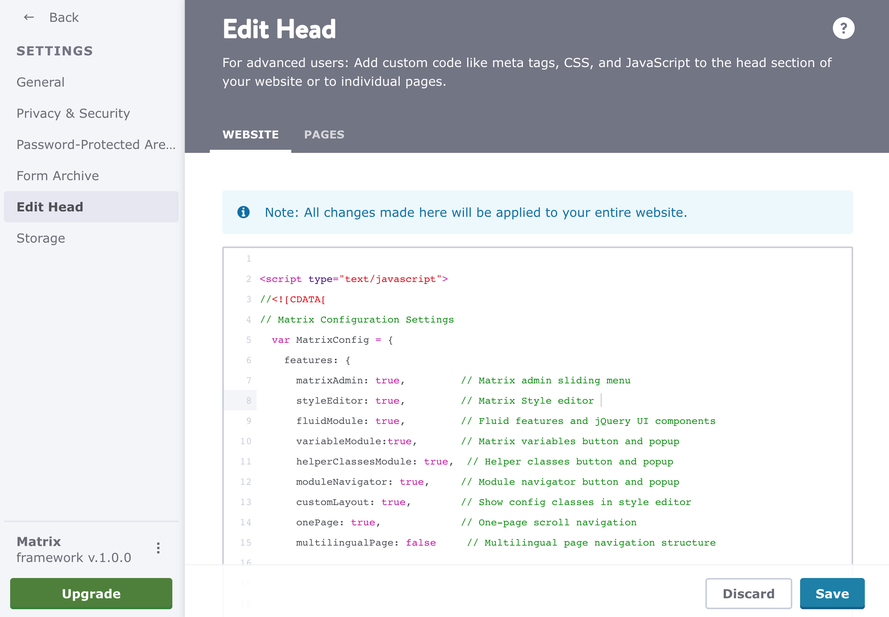
browser-frame

matrix-config.js
<script type="text/javascript">
//<![CDATA[
// Matrix Configuration Settings
  var MatrixConfig = {
    features: {
      matrixAdmin: true,         // Matrix admin sliding menu
      styleEditor: true,         // Matrix Style editor
      fluidModule: false,        // Fluid features and jQuery UI components
      variableModule:true,       // Matrix variables button and popup
      helperClassesModule:true,  // Helper classes button and popup
      templateSelection: true,   // Template selection button and popup in style editor (default: false)
      customModule: true,        // Custom module styles system for module customization
      moduleNavigator: true,     // Module navigator button and popup
      customLayout: true,        // Show config classes in style editor
      onePage: false,             // One-page scroll navigation
      multilingualPage: false,   // Multilingual page navigation structure
      megaMenu: false,           // Mega menu functionality
      pageBuilder: true,         // Page Builder for text modules
      matrixLibrary: true,       // Matrix Widgets Library (Select a widget button + Matrix Library popup)
      matrixAssistant: true     // Matrix Assistant toolbar button + chat 
    }
  };
  //]]>    
</script>
Caution: Be careful not to set all options to true, as some of them are not compatible with each other. For example, if you activate OnePage, then Multilingual Pages and MegaMenu should be deactivated.
Get started
Gobal colors
  bg-primary
  bg-primary-light
  bg-primary-dark
  bg-secondary
  bg-secondary-dark
Template colors
  body
  top-header
  top-header-inner
  header
  header-inner
  navigation-inner
  navigation color
  dropdown background color
  content
Footer Styles
  background
  text color
  link color
  horizontal line
Buttons
  style 1
  style 2
  style 3
  text color
Mobile navigation
  background color
  navigation color
Other elements
  social icons
  top header border
  header border
  nav inner border
  footer border
 
Template configurations
 
has-sticky-logo has-large-header primary-font has-center-nav has-header-blur no-shopping-cart
 
Top header inner


Header inner


Navigation inner


Navigation styles
 
size-15 weight-400
 
Sub-menu (breadcrumbs) styles
 
size-15
 
Mobile Navigation styles
 
size-30
 
Content styles
 
form-white
 
Footer styles
 
o-form has-thin-border has-border-style-solid has-border-top has-footer-border-color
 
Footer background image


Typography

Heading H1
weight-400
 
Heading H2
weight-400
 
Heading H3
weight-400
 
Body text (p, table, td)
 
 
Buttons
weight-400
 
 
Advanced settings
 
Custom CSS

#cc-inner .my-class {

color:#f0f0f0;

}

/* MATRIX-CUSTOM-MODULES-START */

#cc-m-7792741551 h1, #cc-m-7792741551 h2, #cc-m-7792741551 h3 {font-size:20px !important;}

#cc-m-7792741851 h1, #cc-m-7792741851 h2, #cc-m-7792741851 h3 {font-size:20px !important;}

#cc-m-7792930551 h1, #cc-m-7792930551 h2, #cc-m-7792930551 h3 {font-size:20px !important;}

#cc-m-12388126494 h1, #cc-m-12388126494 h2, #cc-m-12388126494 h3 {font-weight:600 !important;}

#cc-m-12388126494 h1, #cc-m-12388126494 h2, #cc-m-12388126494 h3 {font-size:40px !important;}

/* MATRIX-CUSTOM-MODULES-END */

/* MATRIX-GLOBAL-SETTINGS-START */

:root {

--content-width: 1170px;

--special-pages-content-width: 900px;

}

/* HAMBURGER-BAR-START */

:root { --hamburger-btn-background: transparent; --hamburger-btn-bg: transparent; --hamburger-btn-bg-active: transparent; }

/* HAMBURGER-BAR-END */

#cc-inner #hs-container .j-formnew input[type='submit'],

#cc-inner #hs-container input.submitUser,

#cc-inner .hs-button,

#cc-inner .j-calltoaction-link,

#cc-inner input.cc-checkout-btn,

#cc-inner a.cc-shop-addtocard {

padding: 14px 35px !important;

border-radius: 8px;

}

/* MOBILE-FULLWIDTH-BUTTONS-START */

@media only screen and (width <= 746px) {

#cc-inner #hs-container .j-formnew input[type='submit'],

#cc-inner #hs-container input.submitUser,

#cc-inner .hs-button,

#cc-inner .j-calltoaction-link {

width: 100% !important;

margin: 5px auto 0 auto;

box-sizing: border-box;

text-align: center !important;

}

}

/* MOBILE-FULLWIDTH-BUTTONS-END */

/* MATRIX-GLOBAL-SETTINGS-END */


Note:
All changes made here will be applied to your entire website.
draggable-logo

Build faster, smarter, and more flexible Jimdo websites.

has-right-col-border

Products

Matrix Framework

Matrix One

Matrix Plugin Toolkit

Resources

Support

Changelog

Showcase

Marketplace

Community

Blog

Archive

GitHub


About | Privacy Policy | Cookie Policy | Sitemap | Withdraw contract
Created with Jimdo
Log in Log out | Edit
  • Scroll to top
Close