Config Classes
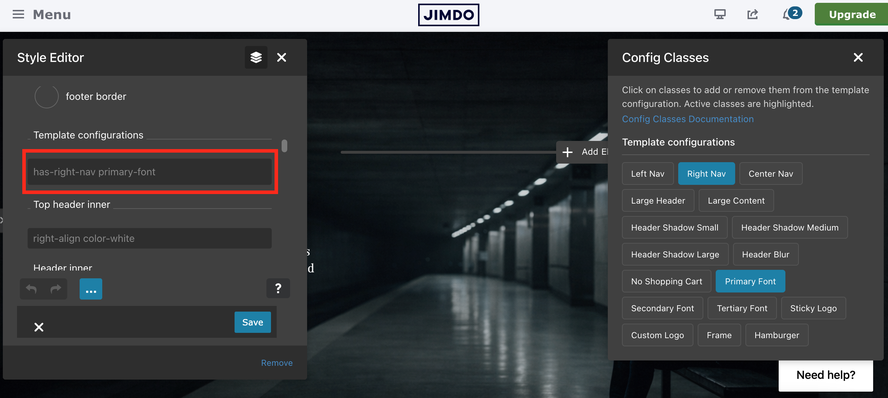
The Config Classes feature provides an intuitive popup interface for managing CSS classes across different template configuration sections. This system allows users to easily add, remove, and manage classes without manually editing HTML or CSS files.
Smart Popup System
- Context-aware: Shows relevant classes based on the clicked config section
- One-time display: Custom CSS popup appears only once per session
- Draggable interface: Users can move the popup to their preferred location
- Click-outside-to-close: Intuitive closing behavior
Mutual Exclusivity Logic
- Group-based: Classes within the same group are mutually exclusive
- Toggle behavior: Clicking an active class deselects it
- Cross-group selection: One class from each group can be active simultaneously
Usage Guide
1. Click any config section (`.config`, `.config1a`, etc.)
2. Select classes from the popup interface
3. See immediate results in the live preview
4. Toggle classes by clicking again to remove
If you have encountered any bugs, errors, or unexpected behavior in the Style Editor, please leave a comment below.