Matrix Framework v1.7.4 is a major workflow update for Jimdo websites. It improves the way designers, agencies, and advanced Jimdo users manage navigation, files, page sections, animations, SEO checks, mobile menu styling, and admin support tools directly inside the Jimdo editor.
This release focuses on practical everyday improvements: faster page reordering with drag and drop, better Custom Layout Files management, a built-in Site Health checker for on-page SEO and technical issues, new Page Builder sections, native Motion Text Split Animations, Slot Counter animations, and continued development of the Matrix Admin Hub.
Hamburger Menu Customization in Global Settings
Introduced in Matrix Framework v1.7.2, the Hamburger Menu section in Global Settings makes it easier to customize the mobile menu icon in Jimdo websites without editing HTML.
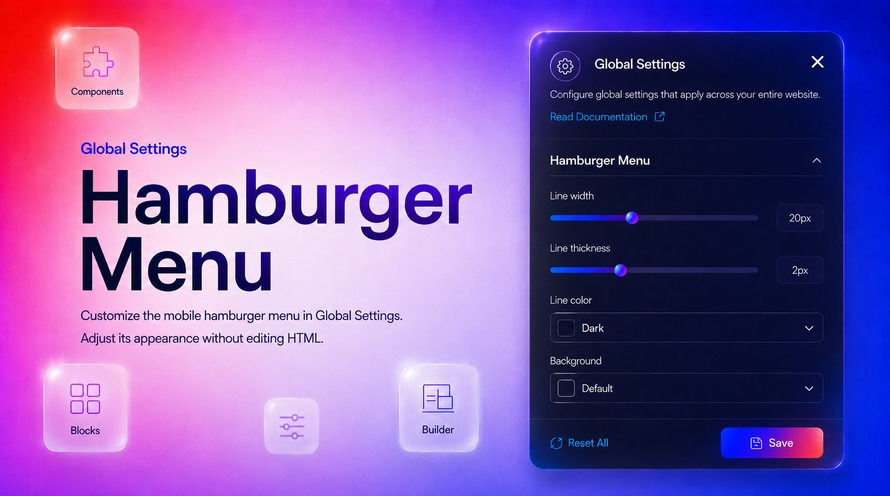
This feature lets you adjust the mobile hamburger toggle directly from the admin interface, with live preview in the Jimdo editor. You can customize the icon line width, line thickness, line color, and button background, making it easier to match the mobile menu with your header, hero section, or overall website design.
The settings apply to both states of the menu icon: the closed hamburger icon with three horizontal bars and the open state where the icon becomes an “X”.
Customization options
The Hamburger Menu settings include:
- Line width — controls the length of the hamburger bars.
- Line thickness — adjusts the visual weight of the icon.
- Line color — choose from dark, light, primary, secondary, and other global theme colors.
- Background — use the default adaptive background, a global color, or a transparent style.
By default, Matrix Framework keeps the original clean hamburger style: a semi-transparent button with dark bars. When using a light icon color, the background adapts automatically to keep the mobile menu readable on darker headers or hero areas
Motion Text Split Animations
Matrix Framework now includes native Motion Text Split Animations, making it easier to create modern scroll-triggered text effects for Jimdo websites without adding extra CDN scripts.
This feature replaces the need for custom GSAP + ScrollTrigger + SplitType snippets by bringing split text animations directly into the Matrix bundle. Text can be split into words or letters and animated when it enters the viewport, creating smooth headline and paragraph effects with a clean, lightweight workflow
What you can animate
Motion Text Split Animations support several ready-to-use effects:
- Words Slide Up
- Words Rotate In
- Words Slide From Right
- Letters Slide Up
- Letters Slide Down
- Letters Fade In
- Letters Fade In Random
- Scrub Each Word
You can use these effects on headings, paragraphs, spans, or other text elements. Each animation is triggered on scroll, and the text remains visible after the animation completes.
Page Builder support
For Page Builder users, split text animations are available directly inside Advanced → Animations for Heading and Text widgets. The animation dropdown is now organized into two groups:
- Standard Animations — regular Matrix motion effects.
- Text Split Animations — word and letter-based text effects.
When a split animation is selected, Matrix automatically applies the correct runtime attributes, splits the text, and animates the inner heading or text element.
Slot Counter Animations
Matrix Framework also includes a native Slot Counter component for creating odometer-style number and text animations directly inside Jimdo websites.
Instead of relying on jQuery or external odometer libraries, Slot Counter is built into the Matrix bundle and powered by Motion One. It animates each digit or letter as a vertical slot reel, creating a smooth counting effect for stats, headlines, numbers, and short text.
Site Health for Jimdo Websites
Site Health is an admin-only Matrix Toolbar module that helps you check the current page directly inside the Jimdo editor preview.
It scans common on-page issues related to SEO, mobile settings, structure, images, links, and Matrix Framework updates, then shows a clear score with passed checks, errors, and warnings.
The goal is not to replace Search Console or a full SEO crawler. Site Health is designed as a practical builder-side helper for Jimdo and Matrix websites, focused on issues that can be fixed directly while editing the page.

What Site Health checks
Site Health scans the current page and highlights common problems such as:
- Missing or empty meta descriptions
- Incorrect heading hierarchy
- Missing or weak image alt text
- Empty, broken, or unsafe links
- Duplicate element IDs
- Logo not linked to the homepage
- Default Jimdo favicon still in use
- Jimdo mobile template still active
- Outdated or mixed Matrix Framework files
When everything is correct, the tool shows a Checks passed summary, making it easier to understand what is already working well.
Jimdo Navigation Drag & Drop Reordering
Matrix Framework now improves the Jimdo navigation editor with drag-and-drop page reordering, making it much faster to organize website menus inside the Jimdo admin area.
Instead of clicking the native up and down arrows repeatedly, each page row in the Edit Navigation panel now includes a simple drag handle. You can grab a page, move it to a new position, and use Jimdo’s normal Save button to persist the updated order.
Faster navigation editing
This enhancement adds a cleaner workflow for managing larger Jimdo menus, especially when a website has many pages or nested sections.
The feature includes:
- A 3-dot drag handle on each navigation row
- A blue drop indicator showing where the page will land
- A highlighted active row while dragging
- Automatic reloading of handles when Jimdo re-renders the navigation list
- Native Jimdo persistence through the existing Save workflow
Custom Layout Files Enhancements
Matrix Framework also improves the Jimdo Custom Layout Files workflow with new tools for uploading and managing files faster inside the admin area.
This update adds one-click Copy URL, multi-file upload, upload progress, and automatic file list refresh directly inside the Jimdo Files tab. It is designed to make working with images, scripts, CSS files, and other layout assets much easier when building Jimdo websites with Matrix.
Faster file management in Jimdo
The enhanced Files tab now includes:
- Copy URL — copy a file’s CDN URL with one click.
- Multi-file upload — select and upload multiple files at once.
- Upload progress — follow the upload status with a clear progress overlay.
- In-place refresh — the file list updates automatically after upload.
This saves time when uploading multiple assets or copying file paths for widgets, custom code, backgrounds, Page Builder sections, or Matrix resources.
Other Improvements and Bug Fixes
Matrix Framework v1.7.4 also includes several smaller improvements across the Page Builder, Style Editor, admin interface, templates, and framework CSS.
New Page Builder sections
The Design Library now includes new pre-designed Page Builder sections, making it faster to start from ready-made layouts and build more polished Jimdo pages with less manual setup.
Style Editor shape options
The Style Editor now includes documented Config Classes shape options for Header inner and Navigation inner.
These options make it easier to apply visual treatments such as skewed sections, diagonal cuts, taper effects, wave shapes, corner styles, and related bar treatments directly from the Style Editor workflow.
Matrix Admin Hub
This release also continues the work on Matrix Admin Hub, the framework’s information and support area inside Jimdo’s native admin sidebar.
The Hub adds a Matrix Framework menu item and provides a built-in place to access site overview details, documentation, support, marketplace pages, news, updates, and the changelog.
It is designed as a read-only support and information center. The General section gives a quick overview of the active Matrix setup, including framework version, build date, license status, active template, and enabled modules.
New default templates: Halmstad and Kalmar
Two new default templates have been added to Template Selection:
- Halmstad — a purple sidebar consulting layout.
- Kalmar — a warm orange business layout with an overlapping header, using Poppins and Playfair Display.
FAQ
What is Matrix Framework v1.7.4?
Matrix Framework v1.7.4 is an update for Matrix Framework, a design and admin toolkit for Jimdo websites. It improves navigation editing, file management, Site Health checks, Page Builder sections, animations, mobile menu customization and Matrix Admin Hub.
Is Matrix Framework v1.7.4 for Jimdo websites?
Yes. Matrix Framework v1.7.4 is designed for Jimdo websites (Jimdo Creator) and improves the admin workflow inside the Jimdo editor and Matrix admin tools.
What is Site Health in Matrix Framework?
Site Health is an admin-only Matrix Toolbar module that checks common page issues related to SEO, heading structure, images, links, mobile settings and Matrix Framework setup.
Does Matrix Framework support drag-and-drop navigation editing?
Yes. Matrix Framework v1.7.4 improves the Jimdo navigation editor with drag-and-drop page reordering, making it faster to organize larger menus and nested pages.
What are Motion Text Split Animations?
Motion Text Split Animations are native Matrix animations that split text into words or letters and animate them on scroll without requiring extra GSAP, ScrollTrigger or SplitType snippets.
What is Matrix Admin Hub?
Matrix Admin Hub is an information and support area inside Jimdo’s native admin sidebar. It provides access to site overview details, documentation, support resources, marketplace pages, news, updates and changelog information.
Write a comment