
The latest updates of Matrix Themes including the new features, bug fixes and much more.
You will also find some further customizations of custom widgets with the live examples.
01. Matrix variables
02. Carousel
The custom carousel has been updated with latest version and now available with the additional styles:
- content carousel
- fullwidth carousel
- fullscreen carousel
- tile carousel
- fullwidth carousel
- quote carousel
- service carousel
- testimonial carousel
- logo carousel
- showcase carousel
- portfolio carousel
How to update
1. In admin Matrix Themes select the section 'Updates' and download the CSS file 'libraries.css'. including the latest version of the owl carousel. Then upload the file to your own website ( Menu> Design> Custom Template> Files ).
2. On the same page download the latest js file (matrix-1.9.6-min.js) and upload it to your own website.
The shortcodes
The content carousel can be found in the section 'shortcodes' of the matrix theme admin menu while all other versions - in section 'Add-ons'
03. hamburger menu styles
Updated the global styles of the hamburger menu. Now it has more classic design with 3 black lines.
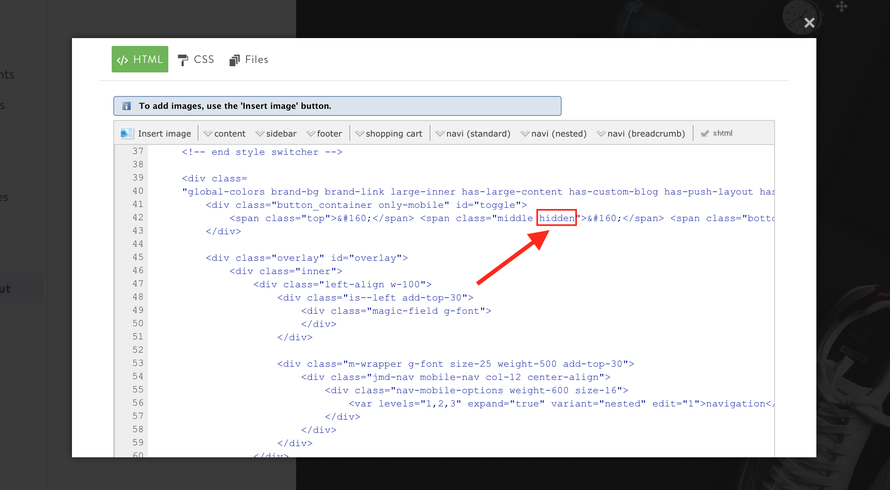
If you want to update your own template with the latest styles, just replace the previous mobile menu styles in CSS ( see below code) and in HTML you'll need to remove the class 'hidden' from the second span 'middle'.


/* overlay menu */
.button_container {
    position: fixed;
    top: 10px;
    right: 10px;
    height: 26px;
    width: 30px;
    border:none!important;
    border-radius:2px!important;
    cursor: pointer;
    z-index:1999999;
    background-color: rgba(255,255,255,0.6);
    -webkit-transition: opacity .25s ease;
    transition: opacity .25s ease;
}
.button_container.active {
    background-color: rgba(255,255,255,0.8);
    height: 27px;
}

.button_container:hover,.button_container:focus {
    opacity: .9;
}

.button_container.active .top {
    -webkit-transform: translateY(9px) translateX(0) rotate(45deg);
    transform: translateY(9px) translateX(0) rotate(45deg);
    background: #000;
    top: 4px;
    width: 21px;
}

.button_container.active .middle {
    opacity: 0;
    background: #fff;
}

.button_container.active .bottom {
    -webkit-transform: translateY(-9px) translateX(0) rotate(-45deg);
    transform: translateY(-9px) translateX(0) rotate(-45deg);
    background: #000;
    top: 22px;
    width: 21px;
}

.button_container span {
    background: #000;
    border: none;
    height: 2px;
    width: 20px;
    position: absolute;
    top: 5px;
    left: 5px;
    font-size:0;
    -webkit-transition: all .35s ease;
    transition: all .35s ease;
    cursor: pointer;
}

.button_container span:nth-of-type(2) {
    top: 12px;
}

.button_container span:nth-of-type(3) {
    top: 19px;
}

.overlay {
    position: fixed;
    z-index:1999998;
    background: #000;
    top: 0;
    left: 0;
    width: 100%;
    height: 100%;
    opacity: 0;
    visibility: hidden;
    -webkit-transition: opacity .35s,visibility .35s,height .35s;
    transition: opacity .35s,visibility .35s,height .35s;
    overflow-x:none;
    overflow-y:auto;
}

.overlay.open {
    opacity: .98;
    visibility: visible;
    height: 100%;
}
Write a comment
sas (Friday, 20 January 2023 10:49)
When I click Add-ons for other versions CAROUSEL
The carousel codes are not displayed on the page
Where's the problem
Matrix themes (Friday, 20 January 2023 10:58)
@sas probably you haven't updated the template with CSS and JS.